
REST API
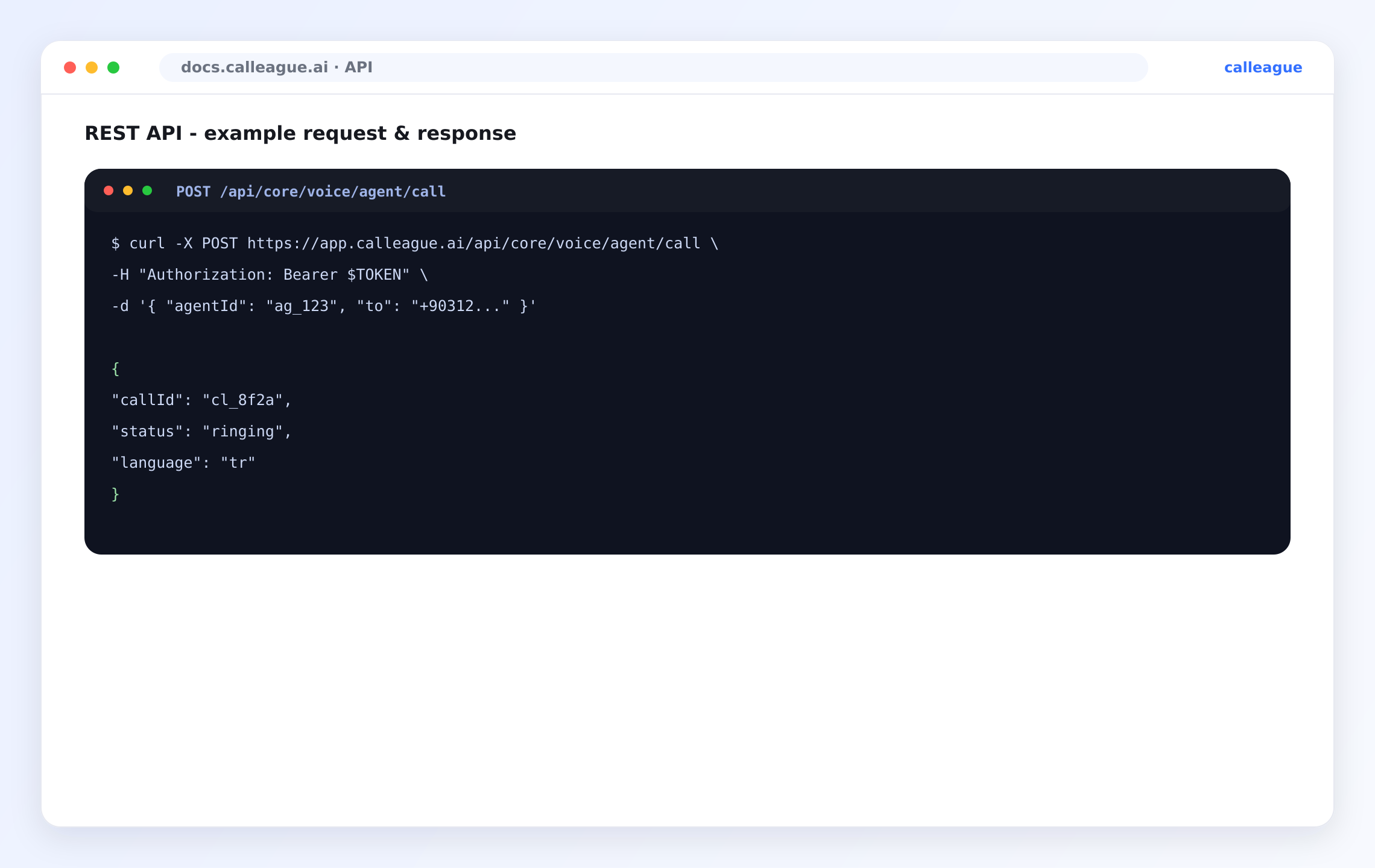
Calleague uygulama API'sini Bearer token ile çağırın — çağrı başlatın, arayıp bulun, asistanları okuyun, listeleri sayfalayın ve hataları ile hız sınırlarını ele alın. Ekran görüntüsündeki gerçek işlenmiş örnekle.
Calleague REST API'si, panoda yaptıklarınızı koddan yapmanızı sağlar: sesli asistanlarınızı çalıştırın, çağrı başlatıp inceleyin ve hesabınızın verilerini okuyun. Bu sayfa temel adresi, Bearer kimlik doğrulamayı, sık kullanılan işlemleri, sayfalamayı, hata kodlarını ve hız sınırlarını kapsar — hepsi ekran görüntüsündeki gerçek istek ve yanıt çevresinde.
Buradaki her şey uygulama düzeyindedir: çalışma alanınız olarak giriş yapar ve güvenli bir bağlantı üzerinden istek gönderirsiniz. Kurulacak hiçbir şey yoktur.
Bir bakışta
| Konu | Özet |
|---|---|
| Taşıma | Güvenli bağlantı (HTTPS), JSON girer JSON çıkar. |
| Kimlik doğrulama | API anahtarı, Authorization: Bearer başlığı olarak. |
| Temel adres | https://app.calleague.ai. |
| Tek bir sonuç | { "callId": "...", "status": "...", ... }. |
| Bir liste | { "total": N, "list": [ ... ] }. |
| Bir hata | code ve message içeren, 2xx olmayan bir yanıt. |
Temel adres
Tüm istekler, https://app.calleague.ai/api/... ile başlayarak Calleague çalışma alanınıza gider. İstekler ve yanıtlar JSON biçimindedir. Gövde gönderen her isteğe Content-Type: application/json ekleyin.
Kimlik doğrulama
Her istek, standart Authorization başlığında Bearer token olarak bir API anahtarı taşır — ekran görüntüsünde gördüğünüz Authorization: Bearer $TOKEN satırının aynısı:
Authorization: Bearer $TOKENAnahtarları uygulamadaki hesap ayarlarınızdan oluşturur, adlandırır ve iptal edersiniz. Bir anahtar sizin izinlerinizi devralır; yani yapabildiğinizi yapar, fazlasını değil.
Bir anahtar oluşturun
Hesap ayarlarınızda API anahtarları alanını açın ve bir tane oluşturun. Tek başına denetleyip iptal edebilmek için entegrasyonuna göre adlandırın.
Anahtarın tam halini oluşturma anında bir kez göreceksiniz.
Bir isteği doğrulayın
Anahtarı her istekte gönderin. Çalıştığını hızlıca doğrulamanın bir yolu asistanlarınızı listelemektir:
curl -s https://app.calleague.ai/api/core/voice/agent/list \
  -H "Authorization: Bearer $TOKEN"
Anahtar geçerliyse asistanlarınızın JSON listesini göreceksiniz.
Yanıtı okuyun
Önce HTTP durumunu kontrol edin, sonra JSON gövdesini okuyun. Bir değeri kullanmadan önce var olduğunu kontrol edin.
Anahtar eksik veya yanlışsa veri yerine 401 alırsınız.
Bir anahtarı asla betiklere, depolara veya belgelere yapıştırmayın. Kendi güvenli saklama alanınızda tutun ve çalışma anında verin. Burada gösterilen anahtarlar örnektir, gerçek kimlik bilgisi değildir.
Sık kullanılan işlemler
İlk satır ekran görüntüsündeki gerçek uç noktadır. Geri kalanlar başvuracağınız tamamlayıcı işlemlerdir; tam yollarını örnek kabul edin ve çalışma alanınız için doğrulayın.
| Yöntem | Yol | Amaç | Gövde |
|---|---|---|---|
POST | /api/core/voice/agent/call | Giden çağrı başlatın. | agentId, to |
GET | /api/core/voice/call/{callId} | Bir çağrının ayrıntısına ve sonucuna bakın. | — |
GET | /api/core/voice/call/list | Son çağrıları listeleyin (sayfalı, süzülebilir). | — |
GET | /api/core/voice/agent/list | Sesli asistanlarınızı listeleyin. | — |
GET | /api/core/voice/agent/{agentId} | Bir asistanın yapılandırmasını okuyun. | — |
POST | /api/core/webhook | Bir webhook uç noktası kaydedin. | url, events |
İstek alanları — çağrı başlatma
| Alan | Yer | Tür | Zorunlu | Açıklama |
|---|---|---|---|---|
agentId | gövde | metin | Evet | Çağrıyı yürütecek sesli asistan (kimliği, örn. ag_123). |
to | gövde | metin | Evet | Aranacak numara, uluslararası biçimde (örn. +90312...). |
metadata | gövde | nesne | Hayır | Çağrıda ve olaylarında geri yansıtılan kendi anahtar/değer çiftleriniz. |
Sorgu alanları — çağrıları listeleme
| Alan | Yer | Tür | Varsayılan | Açıklama |
|---|---|---|---|---|
page | sorgu | tam sayı | 1 | Hangi sayfanın okunacağı (1'den başlar). |
pageSize | sorgu | tam sayı | 20 | Sayfa başına öğe sayısı. |
status | sorgu | metin | — | Duruma göre süzün, örn. completed, failed. |
agentId | sorgu | metin | — | Tek bir asistanla sınırlayın. |
Çağrı başlatma
Bu, ekran görüntüsündeki istek ve yanıtın aynısıdır. Kendi referansınızı (örneğin bir sipariş kimliği) taşımak için isteğe bağlı bir metadata nesnesi ekleyin.
curl -s -X POST https://app.calleague.ai/api/core/voice/agent/call \
  -H "Authorization: Bearer $TOKEN" \
  -H "Content-Type: application/json" \
  -d '{
        "agentId": "ag_123",
        "to": "+90312...",
        "metadata": { "orderId": "A-1042" }
      }'
Başarılı bir başlatma yeni çağrıyı döndürür:
{
  "callId": "cl_8f2a",
  "status": "ringing",
  "language": "tr"
}
Bir çağrıyı arayıp bulma
Nasıl ilerlediğini görmek için tek bir çağrıyı okuyun — ya da bunun yerine haberdar edilmek için webhook'lara güvenin.
curl -s https://app.calleague.ai/api/core/voice/call/cl_8f2a \
  -H "Authorization: Bearer $TOKEN"
{
"callId": "cl_8f2a",
"status": "completed",
"direction": "outbound",
"durationSec": 84,
"endedReason": "completed",
"language": "tr",
"recordingReady": true,
"transcriptReady": true,
"createdAt": "2026-01-01T12:00:00.000Z",
"endedAt": "2026-01-01T12:01:24.000Z"
}Çağrı durum değerleri
| Durum | Anlamı |
|---|---|
ringing | Hedef numara aranıyor. |
in-progress | Bağlandı; görüşme sürüyor. |
completed | Normal şekilde bitti. |
failed | Bağlanamadı veya hata verdi. |
no-answer | Hedef numara açmadı. |
Sayfalama
Çağrıları listelemek sayfalı bir yapı döndürür — boş bir listeyi her zaman zarifçe ele alın:
curl -s "https://app.calleague.ai/api/core/voice/call/list?page=1&pageSize=20" \
  -H "Authorization: Bearer $TOKEN"
{
"total": 0,
"list": []
}Sonuçlar arasında ilerlemek için, topladığınız öğe sayısı total değerine ulaşana kadar page'i artırın.
Bir liste uç noktası haklı olarak boş bir list döndürebilir. Kendi kodunuzda döngüden önce boş bir diziye düşün ve okumadan önce bir değerin var olduğunu kontrol edin — dolu bir yapı varsaymak en sık görülen entegrasyon hatasıdır.
Hata kodları
Başarısız bir istek; 2xx olmayan bir durum, bir code ve okunabilir bir message ile geri döner. Önce HTTP durumuna göre dallanın.
{
  "code": 401,
  "message": "Invalid or missing API key"
}| HTTP | Anlamı | Ne yapmalısınız |
|---|---|---|
400 | Hatalı istek — bozuk JSON veya eksik alan. | Gövdeyi doğrulayın; Content-Type: application/json ayarlayın. |
401 | Giriş yapılmadı — anahtar eksik, yanlış veya iptal. | Authorization: Bearer başlığını ve anahtarı yeniden kontrol edin. |
403 | İzin yok — anahtarın hesabı bu işlemi yapamıyor. | Hesabı işlemi yapabilen bir anahtar kullanın. |
404 | Bulunamadı — bilinmeyen kimlik veya yol. | callId / agentId ve yolu doğrulayın. |
409 | Çakışma — kaynağın durumu işlemi engelliyor. | Kaynağı yeniden okuyun ve çözüldüğünde yeniden deneyin. |
422 | Geçerli JSON ama geçersiz değerler. | Alan değerlerini düzeltin (örn. to geçerli bir numara olmalı). |
429 | Çok fazla istek. | Yavaşlayın ve kısa bir bekleyişin ardından yeniden deneyin. |
5xx | Bizim tarafımızda geçici bir sorun. | Giderek artan bir gecikmeyle yeniden deneyin. |
Hız sınırları
API, çalışma alanı başına adil kullanım sınırları uygular. İstemcinizi buna dayanacak şekilde kurun:
| Uygulama | Neden |
|---|---|
Bir 429'a saygı gösterin | Bekleme pencereniz geçene kadar göndermeyi durdurun. |
| Geri çekilin ve biraz rastgelelik ekleyin | Herkesin aynı anda yeniden denemesini önler. |
| Sürekli kontrol yerine webhook'u tercih edin | Tekrarlanan okumaların çoğunu ortadan kaldırır. |
| Mümkün olduğunda işi gruplayın | Aynı sonuç için daha az istek. |
Bir 429'dan sonra hızlı yeniden denemeler, kısıtlamayı iyileştirmez, kötüleştirir. Bekleyin, biraz rastgelelik ekleyin ve yeniden deneyin — hemen döngüye girmeyin.
Bir şey farklı görünüyorsa
| Belirti | Olası neden | Çözüm |
|---|---|---|
Her istekte 401 | Eksik/süresi dolmuş anahtar veya yanlış başlık | Authorization: Bearer $TOKEN satırını ve anahtarın etkin olduğunu doğrulayın |
POST'ta 400 | Gövde JSON değil veya başlık eksik | Geçerli JSON gönderin ve Content-Type: application/json ayarlayın |
| Kodunuz bir listede çöküyor | list boş geldi | Döngüden önce boş bir diziye düşün |
Var olduğunu bildiğiniz çağrıda 404 | Yanlış kimlik veya eski yol | callId'yi doğrulamak için yeniden listeleyin; yolu kontrol edin |
Sık sık 429 | Çok agresif kontrol | Webhook'a geçin veya istekler arasına bekleme ekleyin |
| Okuduğunuz bir alan eksik | Yeni/isteğe bağlı bir alan yok | Önce var olup olmadığını kontrol edin; tanımadığınız alanları yok sayın |
Sık sorulan sorular
Sırada ne var
Son güncelleme