
Başlangıç
Calleague hesabınıza giriş yapın, Anasayfa ekranınızı tanıyın ve ilk yapay zekâ asistanınızı oluşturmaya hazırlanın — adım adım, teknik bilgi gerekmeden.
Hoş geldiniz! Calleague size, müşterilerinizle yazışan ve telefonlarınıza cevap veren güler yüzlü bir asistan kazandırır. Bu asistan bir yapay zekâdır (İngilizcesi AI — sizin verdiğiniz bilgilerle kendi kendine konuşabilen, soruları yanıtlayabilen bir bilgisayar programı). Sizin sözlerinizle, sizin dilinizde konuşur.
Bu sayfada birlikte üç şey yapacağız: hesabınıza nasıl gireceğinizi göreceğiz, giriş sonrası karşınıza çıkan ana ekranı tanıyacağız ve ilk asistanınızı oluşturmaya hazırlanacağız. Acelesi yok; her şeyi tek tek anlatacağız.
Buradaki her işlem tıkla-geç mantığındadır. Hiçbir teknik bilgiye ihtiyacınız yok; gezinirken yanlışlıkla bir şey bozmanız da mümkün değil.
E-posta gönderebiliyor ya da bir web sayfasında gezinebiliyorsanız, Calleague'u rahatlıkla kullanırsınız. Her adımda hangi düğmeye basacağınızı tek tek söyleyeceğiz.
Bu rehberde birlikte neler yapacağız
| Adım | Sayfa | Ne yapacaksınız | Tahmini süre |
|---|---|---|---|
| 0 | Bu sayfa | Hesabınıza giriş yapın ve Anasayfa ekranını tanıyın | 3 dk |
| 1 | İlk asistanınızı oluşturun | Sizi adım adım yönlendiren 4 adımlık ekranla kurun | 5 dk |
| 2 | İşletmenizi öğretin | Web sitenizi veya belgelerinizi ekleyin | Birkaç dakika |
| 3 | Web sitenize ekleyin | Tek satırlık kodu sitenize (ya da sitenizi yapan kişiye) verin | Birkaç dakika |
| 4 | Telefon numarası bağlayın | Gerçek telefon çağrılarına cevap vermesini sağlayın | Birkaç dakika |
Bunların sonunda; müşterilerinizi karşılayan, sorularını sizin bilgilerinizden yanıtlayan ve gerektiğinde telefona çıkabilen bir asistanınız olacak.
Yukarıdaki 3. adımda geçen tek satırlık kodu (sitenize eklenen küçük bir metin parçası) anlamanıza gerek yok. Sitenizi siz yapmadıysanız, o satırı sitenizi yapan ya da yöneten kişiye iletmeniz yeterli — gerisini o halleder.
Web siteniz yok mu? Sorun değil. Calleague'u web sitesi olmadan da kullanabilirsiniz. Asistanınız için otomatik bir Paylaşım Bağlantısı (tıklayınca sohbet penceresinin açıldığı, müşterilerinize gönderebileceğiniz hazır bir internet adresi) oluşturulur. Bulmak için: asistanınızı oluşturduktan sonra sol menüden Stüdyo'yu açın (telefondaysanız sol üstteki ☰ üç yatay çizgi menüsüne dokunun), asistanınızı açın, Yayınla sekmesine geçin; Kullanmaya Başla kutusundaki Paylaşım Bağlantısı altında Bağlantıyı kopyala düğmesine basın. Sonra WhatsApp'ı açın → bir sohbete girin → mesaj alanına uzun basıp "Yapıştır" deyin → Gönder. Instagram kullanıyorsanız aynı bağlantıyı profil ("biyografi") linkinize koyabilir ya da bir DM (özel mesaj) ile gönderebilirsiniz. Müşteriniz linke dokununca asistanınızla konuşmaya başlar — siteye hiç gerek kalmaz. Dilerseniz bir telefon numarası bağlayarak çağrılara da cevap verdirirsiniz.
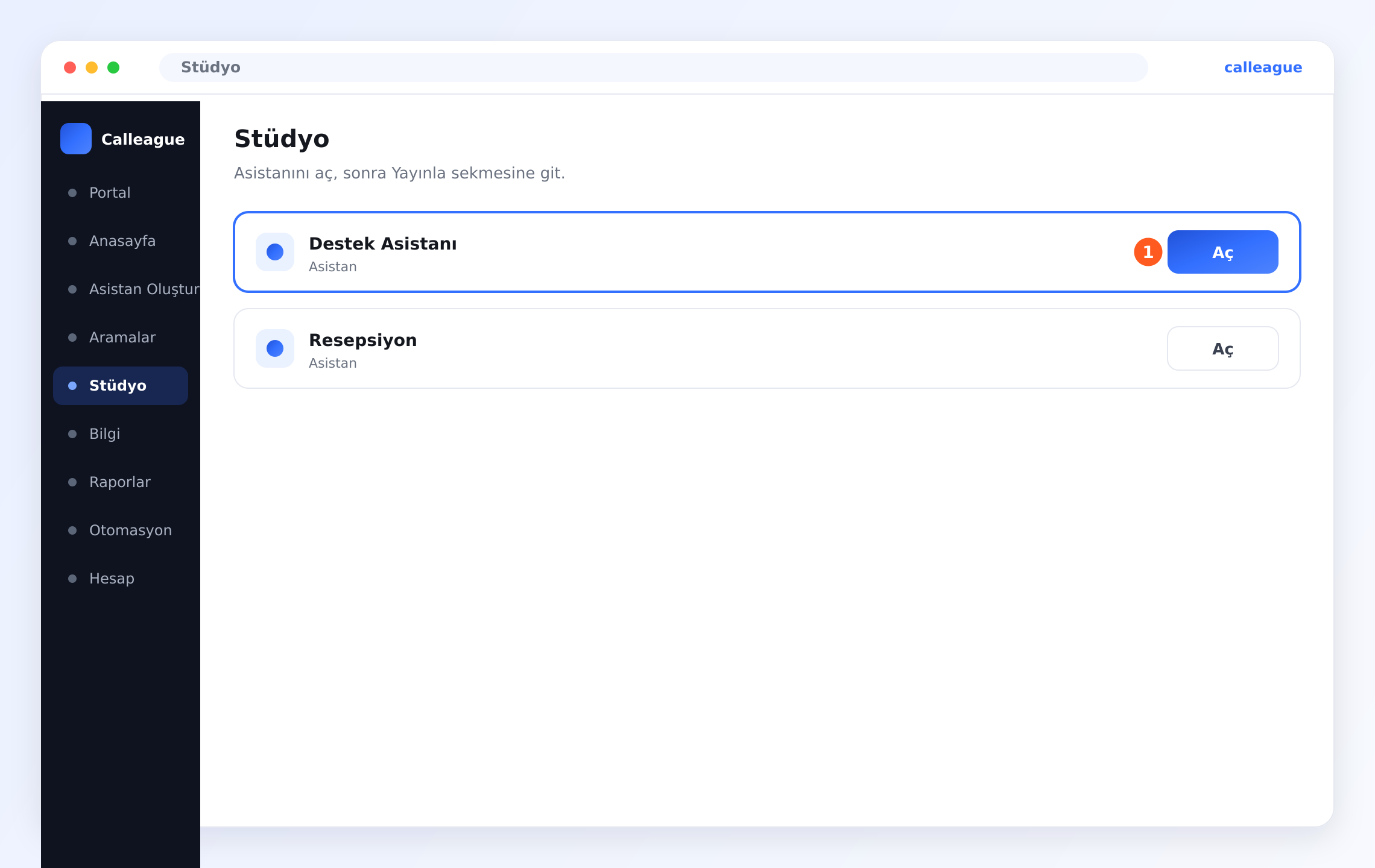
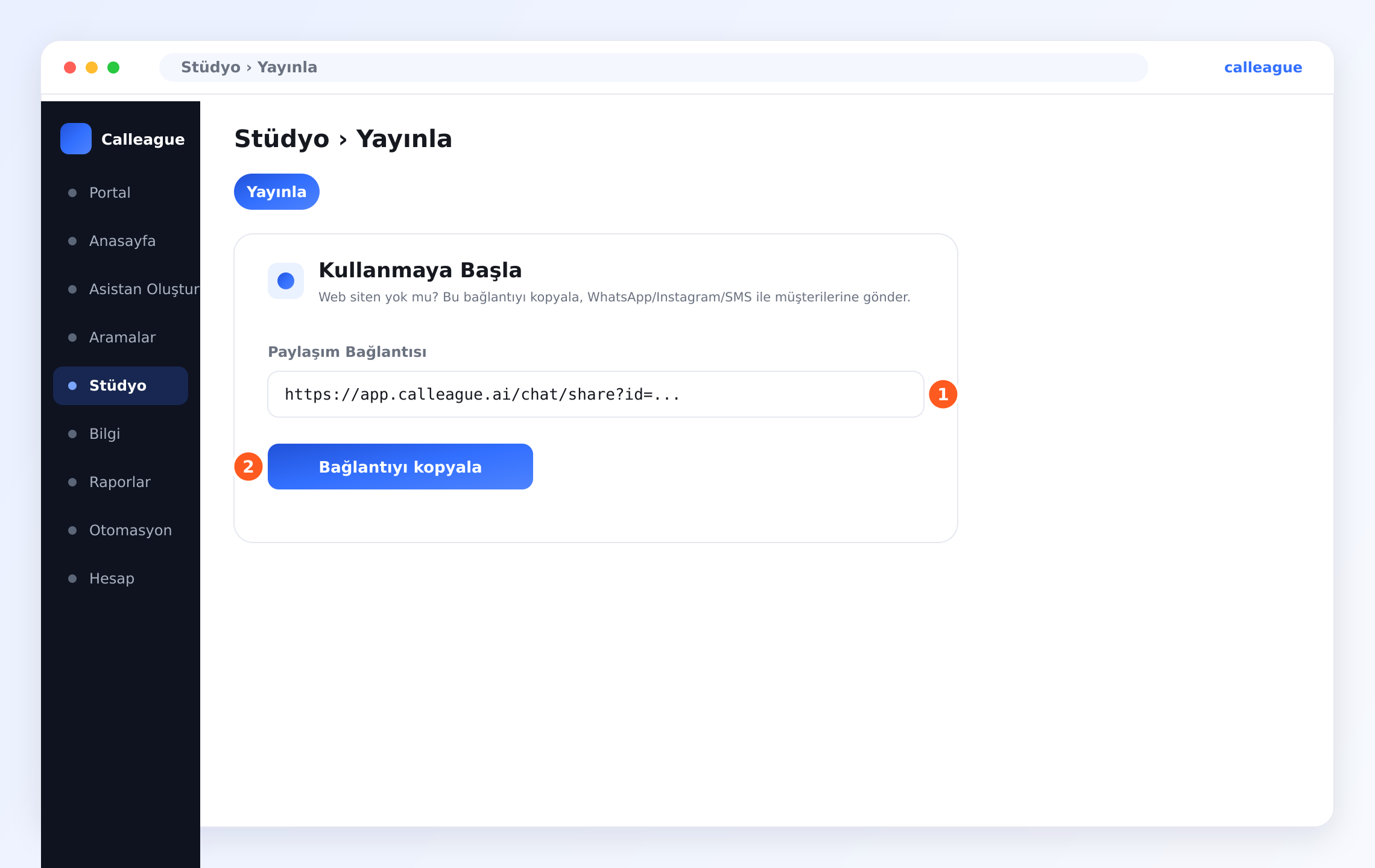
0. Adım: Hesabınızı alın ve giriş yapın
Calleague'da herkese açık bir "kayıt ol" düğmesi yoktur; hesabınızı Calleague oluşturur. Yani önce bir hesap alır, sonra size verilen e-posta ve şifreyle giriş yaparsınız.
Önce bir hesap edinin
Henüz hesabınız yoksa calleague.ai adresindeki Ücretsiz dene / iletişim bölümünü kullanın ya da bize info@arpanet.com.tr adresinden yazın. Size bir e-posta adresi ve bir şifre iletilir. Giriş yaparken bu ikisini kullanacaksınız.
app.calleague.ai adresini açın
Telefonunuzda veya bilgisayarınızda bir internet tarayıcısı açın (internete girdiğiniz program; örneğin Chrome ya da Safari). En üstteki adres çubuğuna app.calleague.ai yazın ve klavyede Git / Ara (bilgisayarda Enter) tuşuna basın. Karşınıza giriş ekranı gelir.
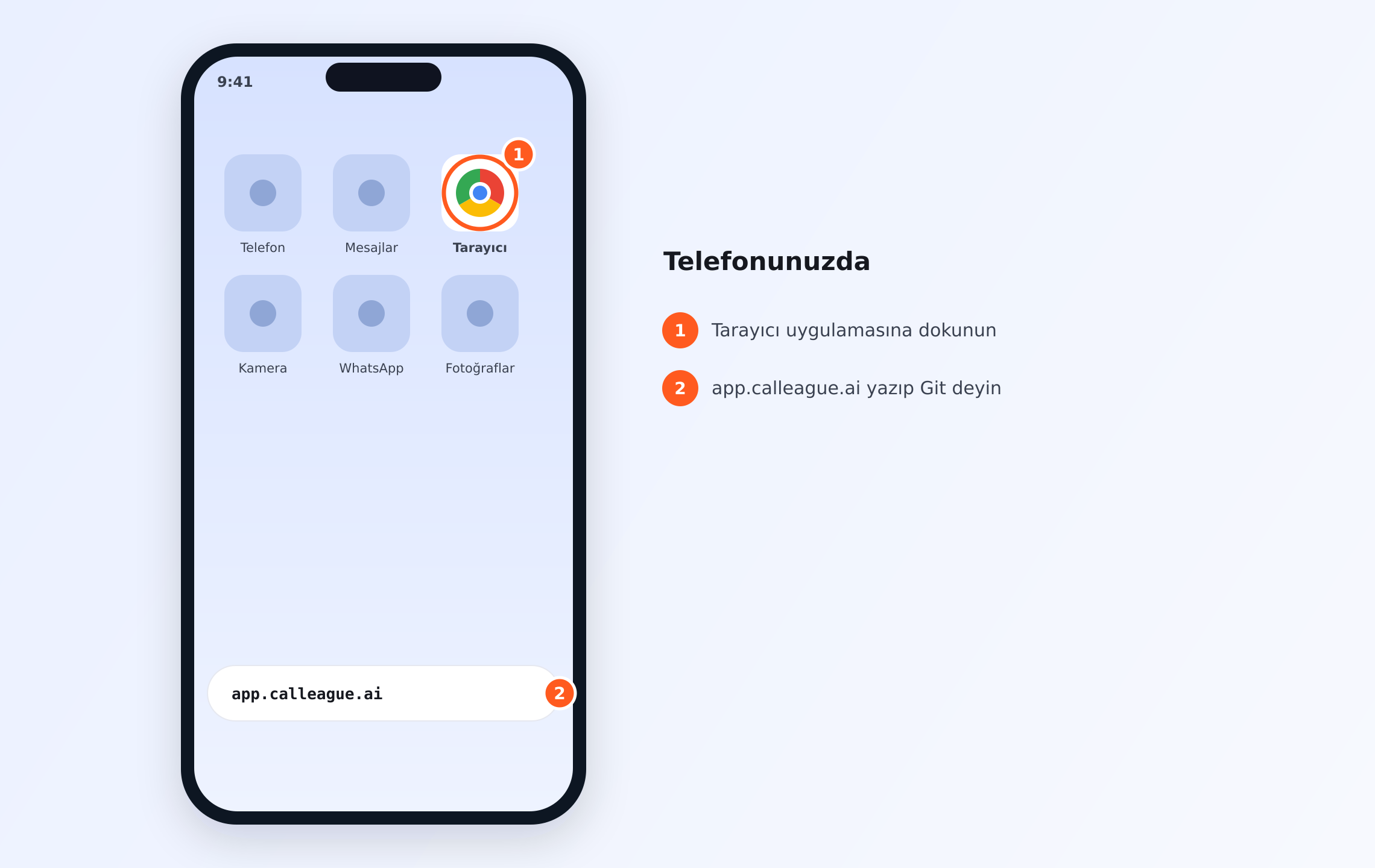
calleague.ai bizim tanıtım sitemizdir; işinizi yaptığınız uygulamanın kendisi ise app.calleague.ai'dir (bu yüzden başında "app." vardır). Giriş için her zaman app.calleague.ai adresini kullanın.
E-postanızı yazın ve "Devam et"e basın
"E-posta, kullanıcı adı veya telefon" yazan kutuya size verilen e-postayı yazın, ardından Devam et düğmesine basın.
Şifrenizi yazın ve "Giriş yap"a basın
Bu kez "Şifre" kutusuna şifrenizi yazın ve Giriş yap düğmesine basın. Şifrenizi unuttuysanız, aynı ekrandaki Şifreni mi unuttun? bağlantısına tıklayın.
Göreceğiniz: giriş yaptıktan sonra doğrudan Anasayfa ekranınıza düşersiniz.
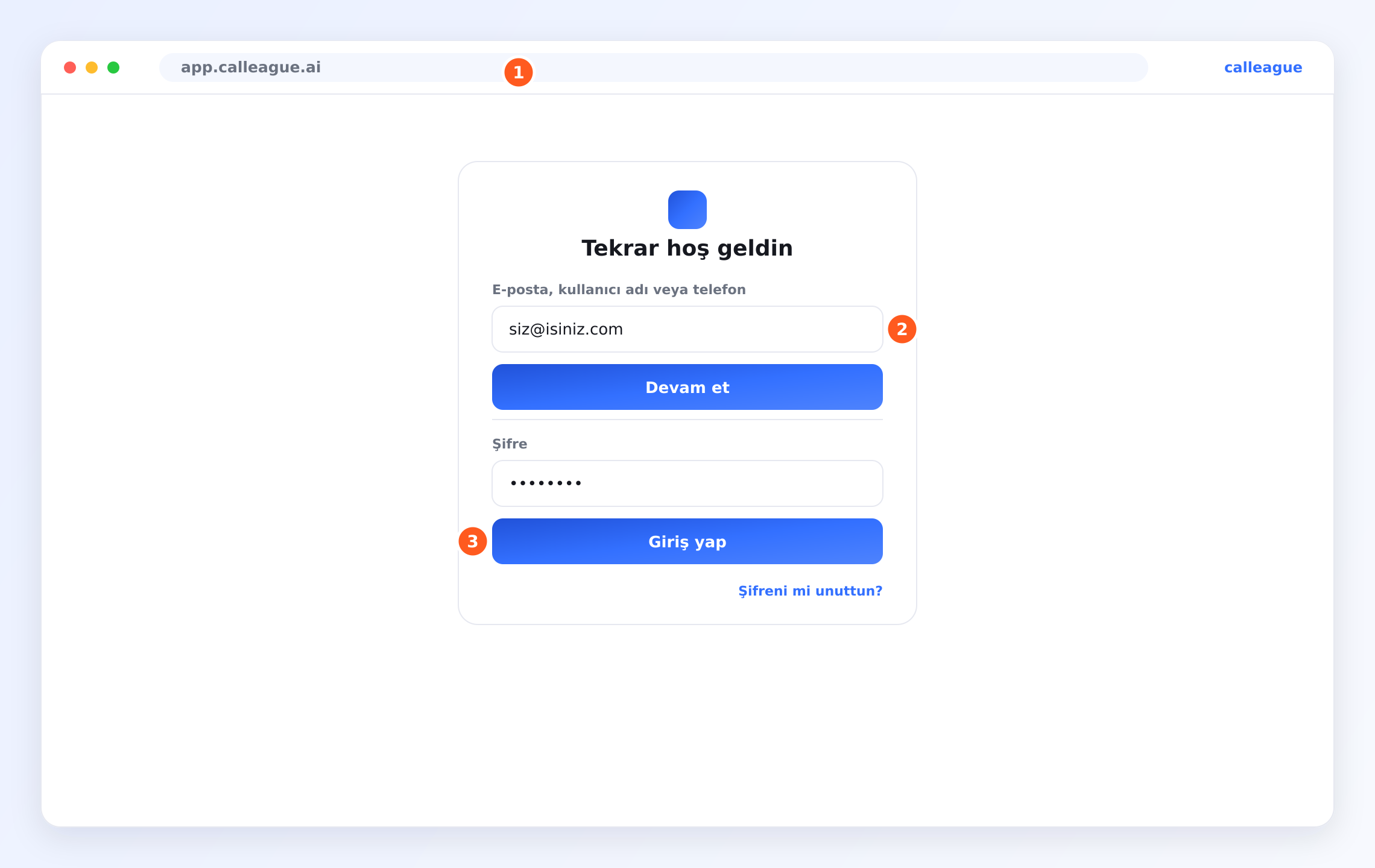
Girişte size ayrıca bir "doğrulama kodu" sorulmaz — yalnızca e-posta ve şifre yeterlidir. Giriş iki adımdır ama ekran her iki alanı birlikte gösterir: önce e-postanı yaz ve Devam et'e bas; sonra Şifre alanına şifreni yaz ve Giriş yap'a bas (giriş ekranı bu görseldeki gibidir). Bu ekranda ① adres çubuğunu, ② e-posta alanı + Devam et düğmesini, ③ şifre alanı + Giriş yap düğmesini görürsünüz.
Anasayfa ekranınızı tanıyın
Giriş yaptığınızda ilk gördüğünüz ekrana Anasayfa denir (giriş sonrası karşınıza çıkan ana ekran, yani "pano"). Burası sizin üs noktanızdır.
Anasayfaya göz atın
En üstte sizi adınızla karşılayan bir selam, ortada dört büyük kart ve altta kısa bir kontrol listesi görürsünüz.
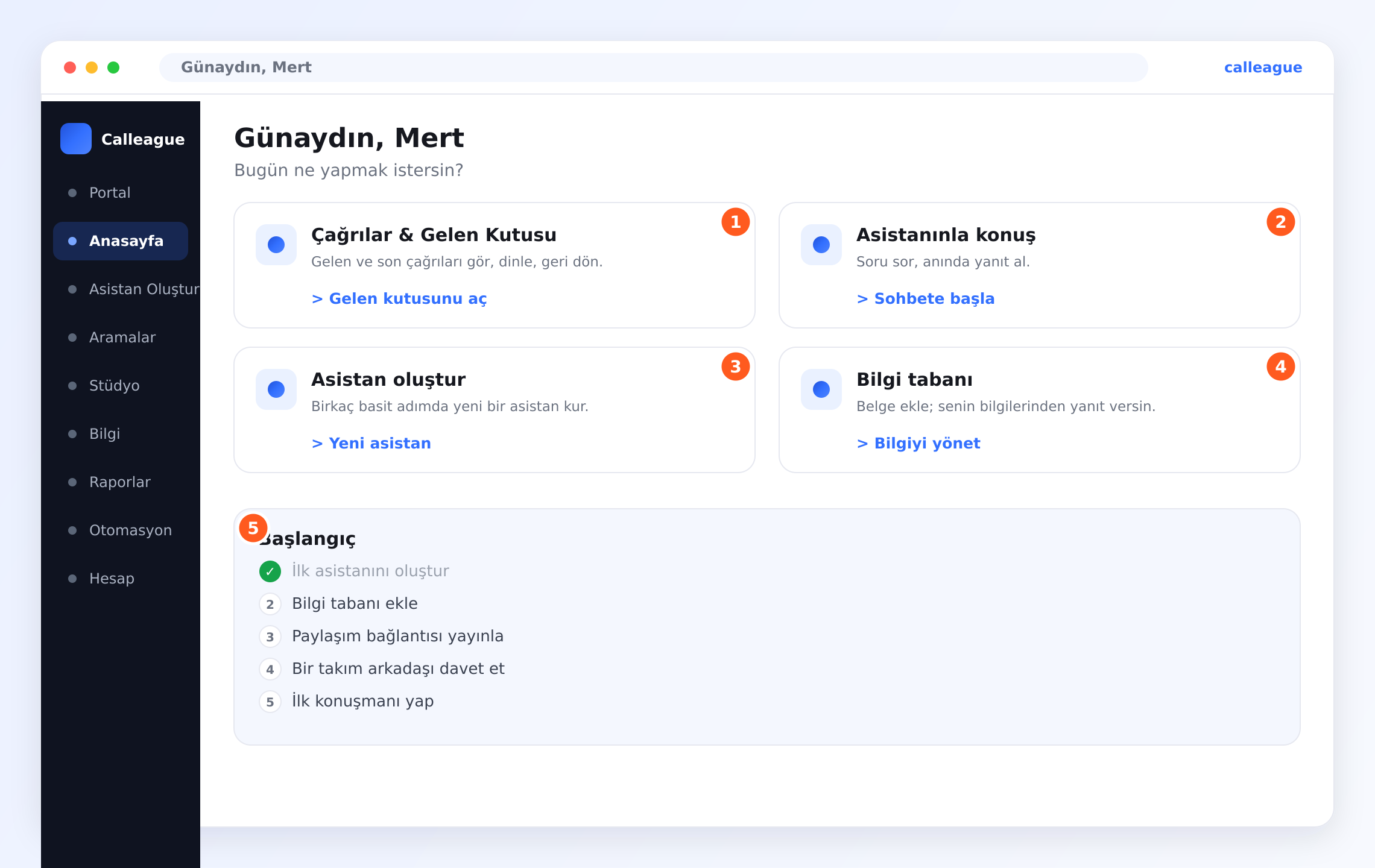
Göreceğiniz dört kart, her birinde net bir düğme:
- ① "Çağrılar & Gelen Kutusu" — Gelen kutusunu aç düğmesi telefon çağrıları listenize götürür.
- ② "Asistanınla konuş" — Sohbete başla düğmesi asistanınızla hemen yazışmanızı sağlar.
- ③ "Asistan oluştur" — Yeni asistan düğmesi asistan kurma ekranını açar. Birazdan kullanacağımız düğme budur.
- ④ "Bilgi tabanı" — Bilgiyi yönet düğmesi, asistana işletmenizi öğrettiğiniz yerdir.
"Başlangıç" kontrol listesini fark edin
Anasayfanın altında (resimde ⑤ ile işaretli) ilerledikçe kendiliğinden işaretlenen kısa bir liste vardır:
- İlk asistanını oluştur
- Bilgi tabanı ekle
- Paylaşım bağlantısı yayınla
- Bir takım arkadaşı davet et
- İlk konuşmanı yap
Bunu güler yüzlü bir yapılacaklar listesi gibi düşünün. Bu listedeki maddelerle en üstteki yol haritası birebir aynı sırada olmayabilir; ikisi de sizi aynı yere götürür — uygulama ek olarak bir Paylaşım Bağlantısı yayınlamanızı ve bir takım arkadaşı davet etmenizi de hatırlatır.
Sol menüde yolunuzu bulun
Sol tarafta her zaman aynı menüyü görürsünüz (telefondaysanız sol üstteki ☰ (üç yatay çizgi = menü) simgesine dokunun): Portal, Anasayfa, Asistan Oluştur, Aramalar, Stüdyo, Bilgi, Raporlar, Otomasyon ve Hesap. En çok Asistan Oluştur, Aramalar, Stüdyo, Bilgi ve Hesap'ı kullanırsınız. (Portal, asistanınızla bizzat yazışıp test edebileceğiniz sohbet ekranıdır; Aramalar sizin gelen kutunuzdur; Stüdyo, asistanlarınızı düzenleyip Yayınla sekmesinden paylaşım bağlantısı aldığınız yerdir; Bilgi, asistana işletmenizi öğrettiğiniz Bilgi tabanı'dır; Otomasyon ise kendiliğinden çalışan hazır kurallardır — yeni başlıyorsanız şimdilik gerekmez.)
Göreceğiniz bulunduğunuz sayfa menüde renkli olarak vurgulanır; böylece nerede olduğunuzu hep bilirsiniz.
Yepyeni bir hesapta bu ekranlar ve listeler boş görünebilir — bu tamamen normaldir. İlk asistanınızı oluşturup ilk çağrılarınız gelmeye başlayınca dolarlar.
Acele etmeden etrafa tıklayın. Asistanınızı yayınlayana ya da gerçek bir telefon numarası bağlayana kadar müşterilerinize hiçbir şey ulaşmaz — gönül rahatlığıyla keşfedin.
Gerçek bir örnek
Küçük bir diş kliniği düşünün. Telefon gün boyu çalıyor: "Cumartesi açık mısınız?" ve "Diş temizliği için randevu alabilir miyim?" — üstelik bazı aramalar kimsenin bakamadığı mesai dışı saatlerde geliyor.
Calleague ile "Resepsiyon" adında bir asistan oluşturur, ona çalışma saatlerinizi ve fiyatlarınızı öğretirsiniz. Web siteniz varsa, sitenizin köşesinde açılan küçük bir sohbet balonu (widget) koyarsınız; siteniz yoksa, asistanın Paylaşım Bağlantısı'nı müşterilerinize WhatsApp'tan gönderirsiniz. Sonra telefon numaranızı bağlarsınız. Artık müşteriler gece gündüz güler yüzlü ve doğru bir yanıt alır, her konuşma da gelen kutunuzda sizi bekler. Aynı mantık sipariş alan bir çiçekçi, "kargom nerede?" sorularını yanıtlayan bir mağaza ya da arayanları doğru kişiye yönlendiren yoğun bir ofis için de geçerlidir.
Bir şey farklı görünüyorsa
| Gördüğünüz | Nedeni | Ne yapmalısınız |
|---|---|---|
| Giriş yapamıyorum | E-posta ya da şifre yanlış yazılmış | Giriş ekranındaki Şifreni mi unuttun? bağlantısını kullanın; hâlâ olmuyorsa bize yazın |
| "Devam et"ten sonra şifre kutusu çıkmıyor | E-posta yanlış ya da eksik yazılmış | E-postayı tam ve doğru yazdığınızdan emin olup tekrar deneyin |
| Anasayfam bomboş görünüyor | Henüz hiçbir şey kurmadığınız yepyeni bir hesap | Bu normaldir — ③ "Asistan oluştur" kartındaki Yeni asistan ile başlayın |
| Karşılamada başka bir isim yazıyor | Sizi kendi hesap adınızla selamlar | Bu beklenir — buradaki örnek ekranlarda "Mert" yazıyor |
| Hesabım yok / "kayıt ol" bulamıyorum | Calleague'da kayıt ol düğmesi yoktur; hesap size verilir | calleague.ai'deki Ücretsiz dene ile ya da info@arpanet.com.tr'den hesap isteyin |
Sıkça sorulan sorular
Sırada ne var
Giriş yaptınız ve yolunuzu öğrendiniz. Şimdi asistanınızı oluşturalım.
İlk asistanınızı oluşturun
Sizi adım adım yönlendiren 4 adımlık kolay bir sihirbaz.
İşletmenizi öğretin
Web sitenizi veya belgelerinizi ekleyin; sizin bilgilerinizden yanıtlasın.
Web sitenize ekleyin
Sohbet aracını eklemek için tek satırlık kodu kopyalayın.
Telefon numarası bağlayın
Asistanınızın gerçek çağrılara cevap vermesini sağlayın.
Takıldınız mı veya bir sorunuz mu var? Yardımcı olmaktan mutluluk duyarız — bize info@arpanet.com.tr adresinden yazın. Calleague, Ankara'daki Arpanet Bilişim Teknolojileri A.Ş. tarafından geliştirilmiştir.
Son güncelleme