
Asistanını kullan
Günlük çalışma merkeziniz — uygulamada her şey nerede, asistanınız neler yapar ve etrafta nasıl yolunuzu bulursunuz. Teknik bilgi gerekmez.
Asistanınız kurulduktan sonra onunla günlük hayatınız burada geçer: çağrıları yanıtlamak, konuşmaları okumak, ne olup bittiğini kontrol etmek ve küçük ayarlar yapmak. Her şey tek bir yerde olur — app.calleague.ai adresindeki uygulamada. (calleague.ai bizim tanıtım sitemizdir; işinizi yaptığınız yer ise uygulamanın kendisi olan app.calleague.ai'dir.) Kurulacak hiçbir şey, öğrenilecek teknik bir şey yok.
Bu sayfa sizin haritanız. Size Anasayfa'yı (giriş yaptıktan sonra gelen ana ekran), soldaki menüyü ve gününüzün her parçasının nerede durduğunu gösterir.
Henüz hesabınız ya da asistanınız yok mu? Bu sayfa bir kurulum değil, bir haritadır — uygulamada her şeyin nerede olduğunu gösterir. Burayı kullanmak için önce bir hesabınız ve en az bir asistanınız olmalı.
- Hesabınız yoksa: Calleague'de herkese açık "kayıt ol" düğmesi yoktur; hesabı biz veririz. calleague.ai üzerindeki "Ücretsiz dene" ile ya da info@arpanet.com.tr adresinden isteyin — size bir e-posta ve şifre verilir.
- Asistanınız yoksa: önce İlk asistanınızı oluşturun.
- Yepyeniyseniz en baştan başlayın: Başlangıç.
Uygulamayı küçük bir ofisin resepsiyon masası gibi düşünün. Anasayfa oturduğunuz masa; soldaki menü ise her odaya açılan kapılar dizisidir — çağrılar, bilgi, raporlar ve dahası.
Web siteniz yok mu? Sorun değil. Asistanınızı kullanmak için web sitesi şart değildir.
- Paylaşım Bağlantısı (müşterilere gönderdiğiniz hazır bir sohbet linki) ile WhatsApp, Instagram ya da SMS üzerinden paylaşın.
- Ya da Portal'dan (soldaki menüde) asistanınızla doğrudan buradan sohbet edin.
- Asistanınız telefonla da çalışır.
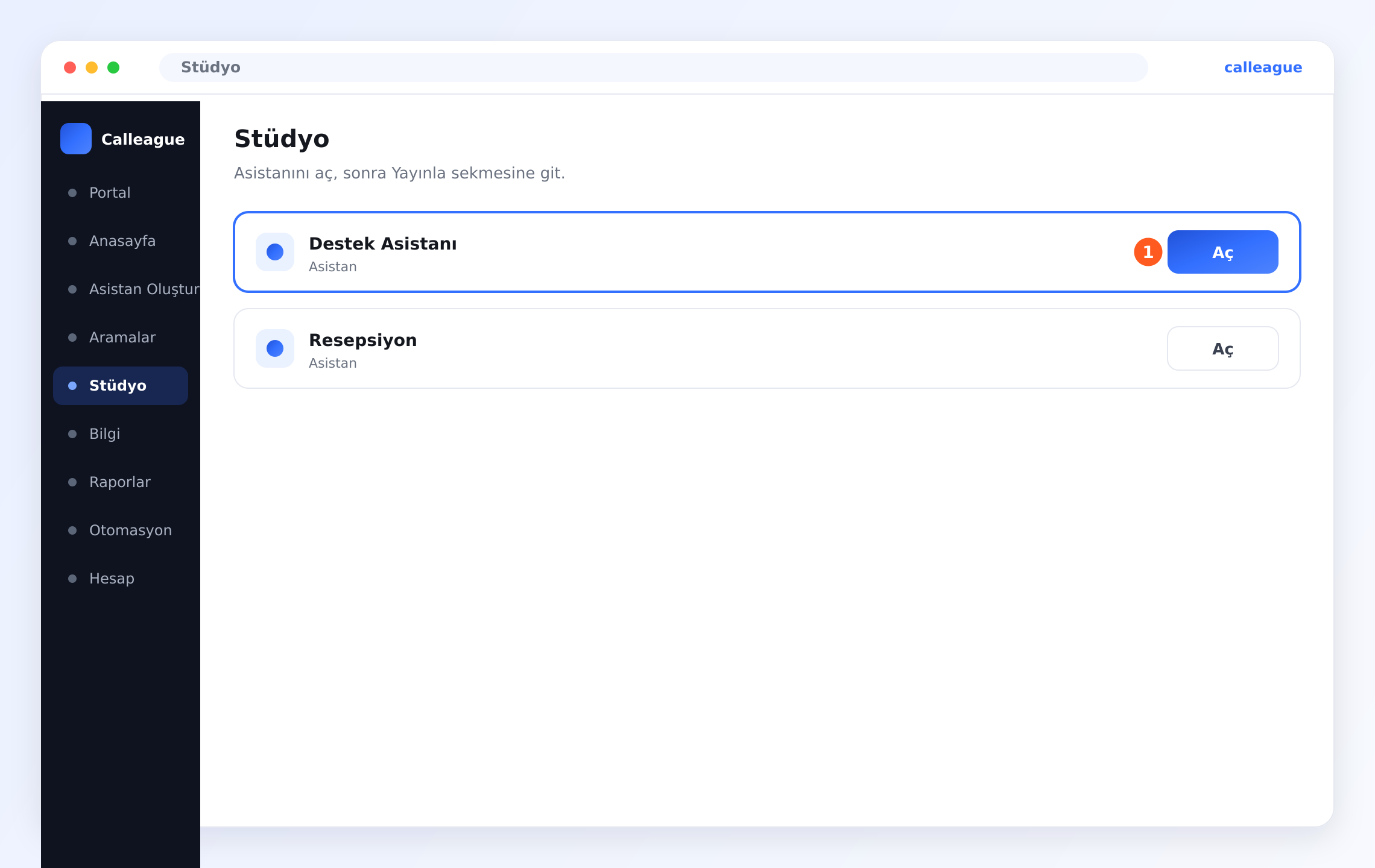
Web siteniz yoksa en pratik yol Paylaşım Bağlantısı'dır — müşterilere gönderdiğiniz hazır bir sohbet linki. Asistanınızı oluşturduğunuzda bu bağlantı kendiliğinden üretilir. Bulmak için sol menüden "Stüdyo"ya gidin (telefonda sol üstte üç yatay çizgi ☰ menüsüne dokunun) ve açılan listede asistanınızın satırındaki "Aç" (①) düğmesine tıklayın.
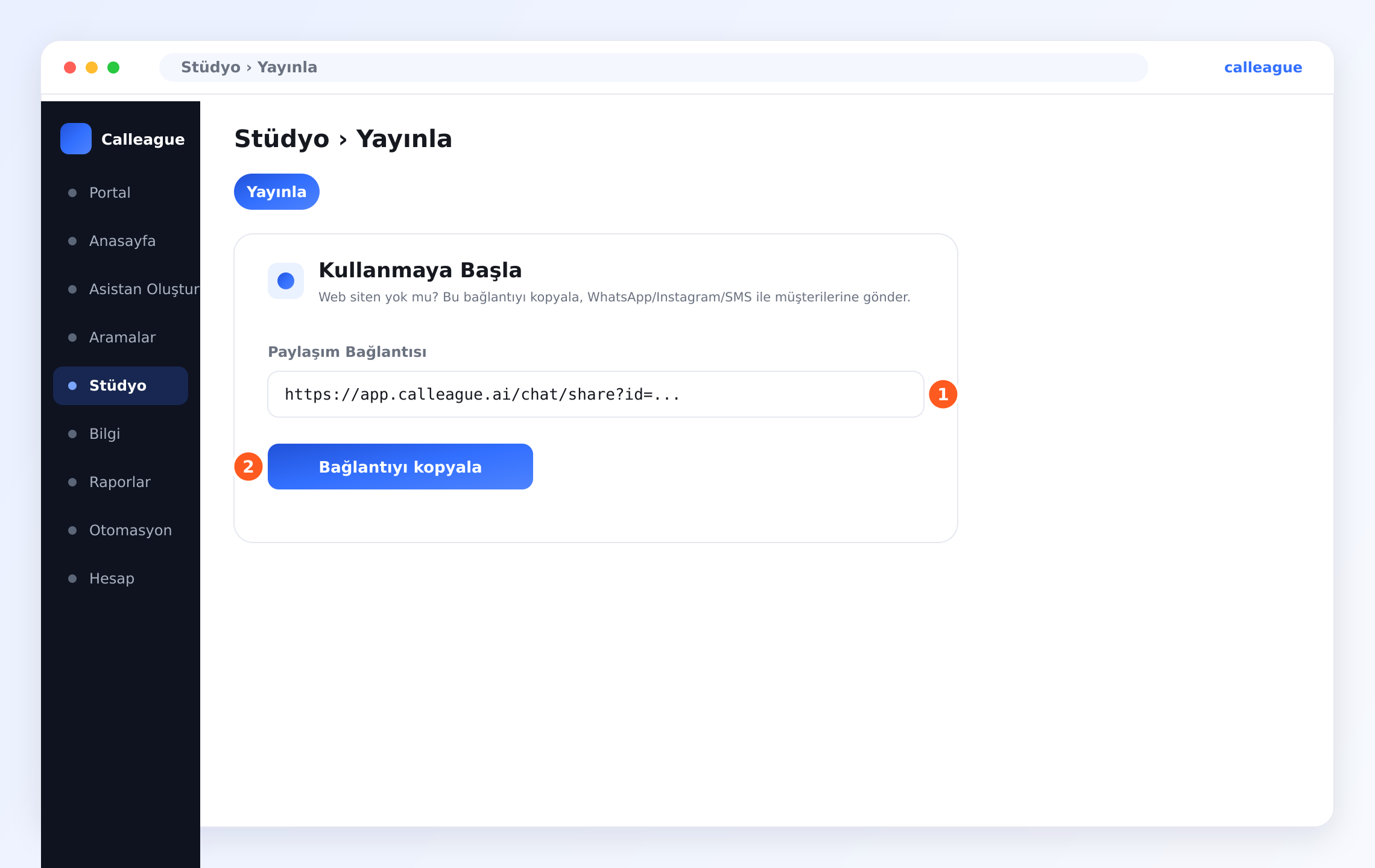
Asistanınız açıldığında üstteki "Yayınla" sekmesine geçin; oradaki "Kullanmaya Başla" kutusunda **"Paylaşım Bağlantısı" (①)**nın altındaki **"Bağlantıyı kopyala" (②)**ya tıklayın.
Ardından WhatsApp'ı açın → bir sohbete girin → mesaj alanına uzun basıp "Yapıştır" deyin → Gönder. Instagram'da bağlantıyı profil ("biyografi") linkine koyabilir ya da bir DM/mesajda gönderebilirsiniz. Müşteriniz linke dokununca asistanınızla konuşur.
Burada neler yapacaksınız
Giriş yapın, Anasayfa'ya inin ve dört büyük kartla soldaki menüyü kullanarak her şeye ulaşın: çağrı gelen kutunuzu açın, asistanınızla sohbet edin, asistan oluşturun ya da düzenleyin ve asistanın neyi bildiğini yönetin.
Anasayfa ekranında yolunuzu bulun
Tarayıcıyı açın ve giriş yapın
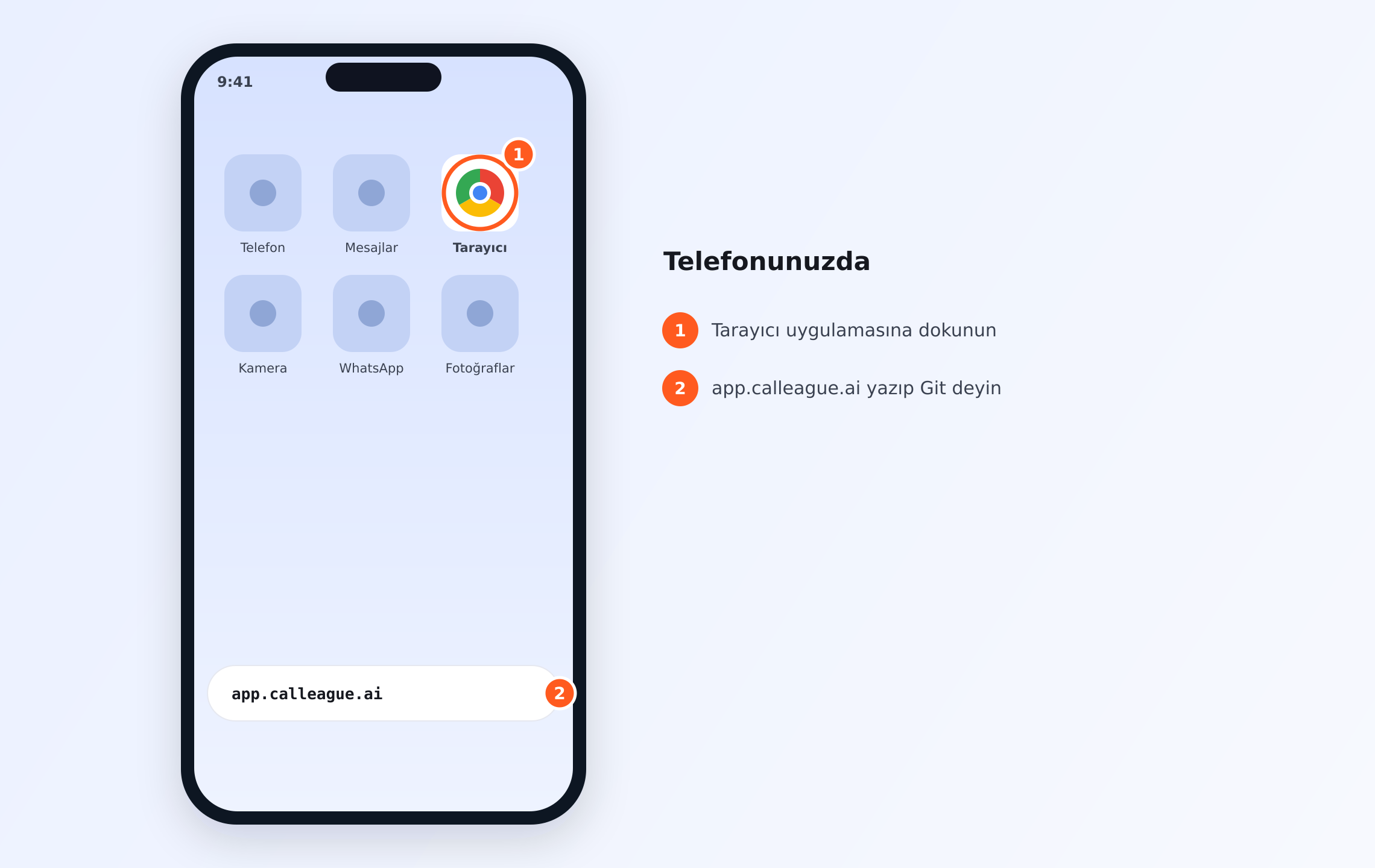
- Telefonunuzda veya bilgisayarınızda bir internet tarayıcısı açın (Chrome, Safari gibi — telefonunuzun ana ekranındaki o simge) (①).
- En üstteki adres çubuğuna (tarayıcının tepesindeki uzun beyaz çubuk)
app.calleague.aiyazın ve klavyede "Git" / "Ara" (bilgisayarda Enter) tuşuna basın (②).
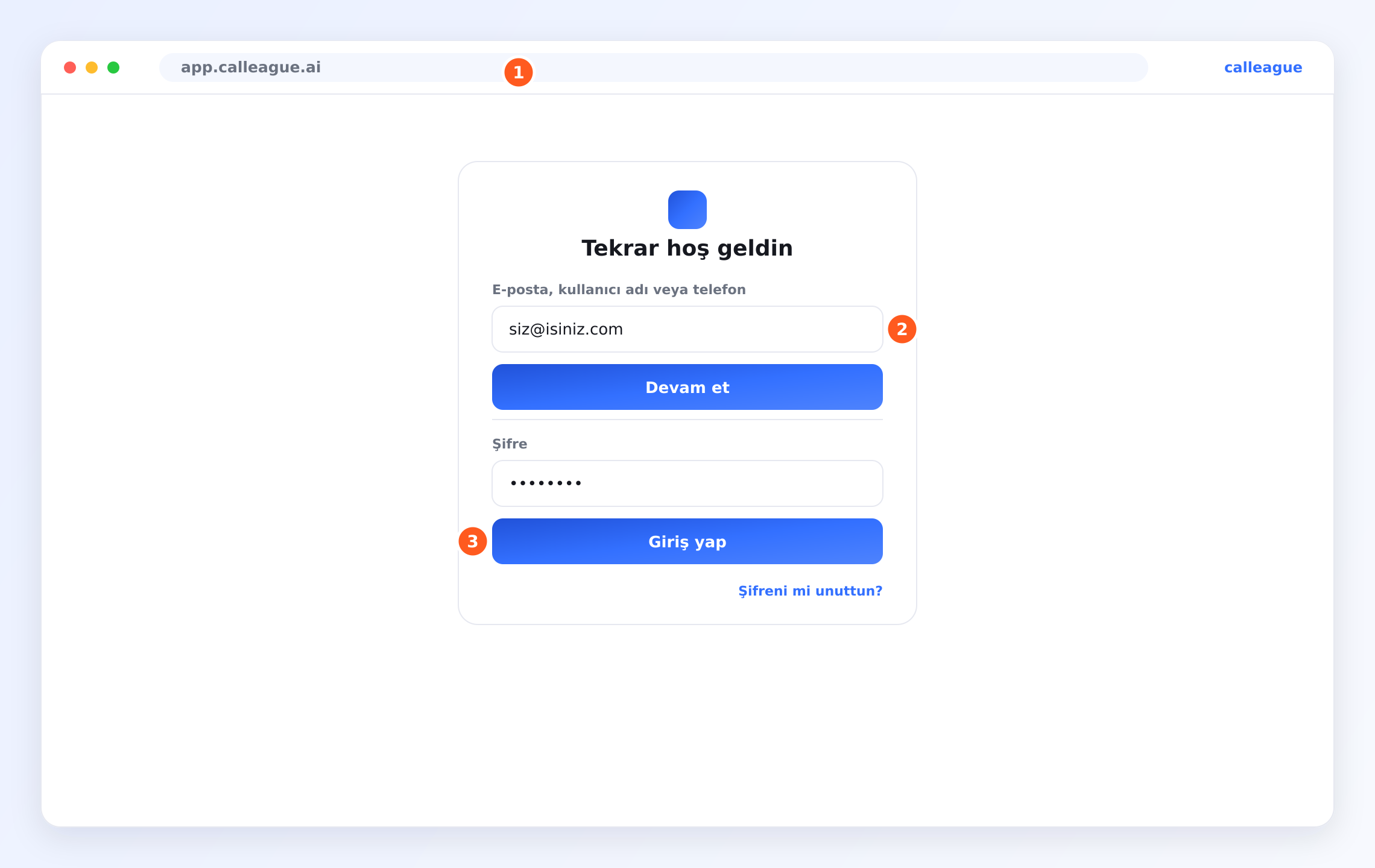
- Açılan giriş ekranında "E-posta, kullanıcı adı veya telefon" kutusuna e-postanızı yazın ve **"Devam et"**e basın; sonra "Şifre" alanına şifrenizi yazın ve **"Giriş yap"**a basın (giriş ekranı bu görseldeki gibidir). Şifrenizi unuttuysanız altta "Şifreni mi unuttun?" bağlantısını kullanın.
Giriş yapınca Anasayfa ekranına düşersiniz. "Günaydın" gibi sıcak bir selamla ve "Bugün ne yapmak istersiniz?" sorusuyla açılır.
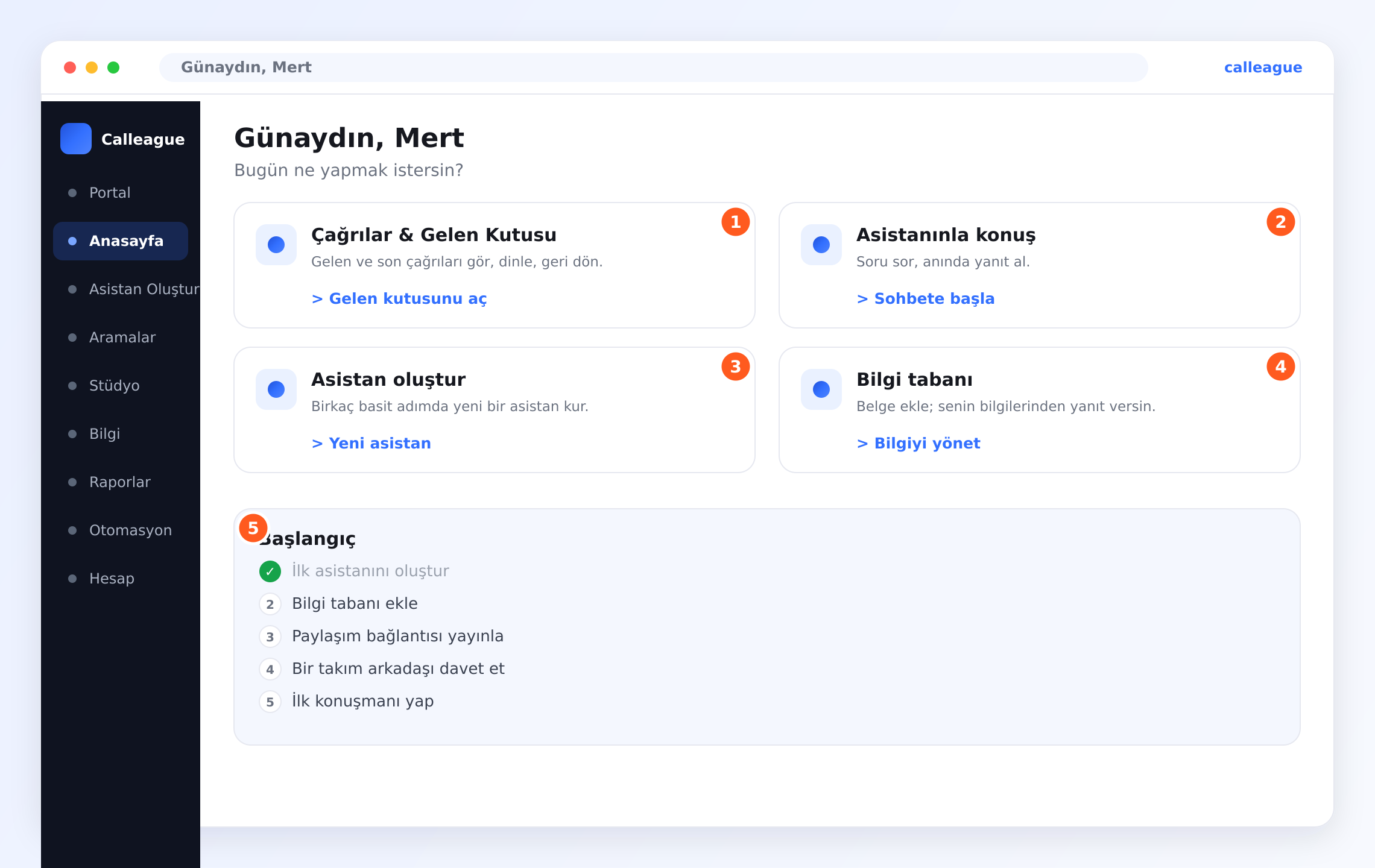
Ortada dört büyük kart, altlarında da bir Başlangıç kontrol listesi görürsünüz.
Tüm giriş adımlarının ekran ekran anlatımı Başlangıç sayfasındadır. Girişte size bir "doğrulama kodu" sorulmaz.
Çağrı gelen kutunuzu açın
Resimdeki ① "Çağrılar & Gelen Kutusu" kartı telefon çağrılarınızın listesidir. Gelen ve son çağrıları görmek, geri dinlemek ve takip etmek için **"Gelen kutusunu aç"**a tıklayın.
Her çağrıyı düzenli bir listede görürsünüz — tamamı Çağrılarınızı görün sayfasında.
Asistanınızla konuşun
② "Asistanınla konuş" kartı, asistanınızla bizzat sohbet etmenizi sağlar. Ona soru sorup anında yanıt almak için **"Sohbete başla"**ya tıklayın — neyi bildiğini denemenin en kolay yolu. Bu sohbet ekranına Portal (asistanla sohbet ettiğiniz ekran) da denir.
Bir mesaj yazabileceğiniz sohbet penceresi açılır; tıpkı bir müşterinin telefonda soracağı gibi.
Asistan oluşturun ya da düzenleyin
③ "Asistan oluştur" kartı yeni asistanların doğduğu yerdir. Birkaç basit adımda bir tane kurmak için **"Yeni asistan"**a tıklayın. Karşınıza bir sihirbaz (sizi adım adım yönlendiren ekran) çıkar.
Tüm anlatım İlk asistanınızı oluşturun sayfasındadır.
Asistanın neyi bildiğini yönetin
④ "Bilgi tabanı" kartı, asistanınızın yanıtlarını dayandırdığı bilgiyi tutar. Belge ve web sitesi eklemek için **"Bilgiyi yönet"**e tıklayın.
Bir web adresi (URL — yani web adresi, ör. www.isiniz.com) ekleyebileceğiniz ya da belge yükleyebileceğiniz bilgi alanı açılır; böylece asistan sizin bilgilerinizden yanıt verir. Asistan bilgiyi okuyup işini bitirdiğinde "İndekslendi" (asistan okudu, artık biliyor) yazısını görürsünüz.
Başlangıç kontrol listesini izleyin
Kartların altında ⑤ "Başlangıç" kontrol listesi vardır. İlk yapılacak birkaç şeyi adım adım gösterir ve siz ilerledikçe kendiliğinden işaretler: ilk asistanınızı oluşturun, bilgi tabanı ekleyin, bir Paylaşım Bağlantısı (müşterilere gönderilen hazır sohbet linki) yayınlayın, bir takım arkadaşı davet edin ve ilk konuşmanızı yapın.
Her maddeyi tamamladıkça yanına yeşil bir tik düşer — hiçbir adımı atlamadığınızı anlamanın kolay yolu.
Her şeyi bir anda yapmak zorunda değilsiniz. Çoğu işletme önce tek bir asistan oluşturup ilk konuşmasını yapar, sonra bilgi ekleyip takım arkadaşı davet eder. Geri döndüğünüzde kontrol listesi yine orada olur.
Soldaki menü
Sol kenarda boydan boya uzanan koyu menü, odalar arasında gezinme şeklinizdir ve her ekranda aynıdır. (Telefonda bu menü gizlidir — sol üstteki ☰ düğmesine dokununca açılır. ☰ üç yatay çizgidir; yani menü düğmesi.)
| Menü öğesi | Ne işe yarar |
|---|---|
| Portal | Ön kapınız — asistanınızla bizzat sohbet ettiğiniz ekran. |
| Anasayfa | Dört kart ve kontrol listesi olan ana ekran. |
| Asistan Oluştur | Yeni bir asistan kurmak için sihirbazı (adım adım yönlendiren ekran) başlatır. |
| Aramalar — gelen kutunuz | Gelen ve son telefon çağrılarınızın listesi. |
| Stüdyo | Asistanlarınızı oluşturduğunuz ve yönettiğiniz yer. Bir asistanı buradan açıp "Yayınla" sekmesinden Paylaşım Bağlantısı'nı alırsınız. |
| Bilgi | Asistanınızın yanıtlarını dayandırdığı belge ve web siteleri (açtığınızda sayfa başlığı Bilgi tabanı'dır). |
| Raporlar | Çağrılarınızın ve asistanınızın nasıl gittiğine dair sade bir görünüm. |
| Otomasyon | Çağrıların etrafında kendiliğinden çalışan hazır kurallar kurarsınız (ör. kaçırılan çağrıdan sonra otomatik SMS). Yeni başlayan biri için şart değildir. |
| Hesap | Profiliniz, ekibiniz, faturalandırma ve telefon numaralarınız. |
Ana alanlara genel bakış
| Alan | Orada ne yaparsınız | Devamını okuyun |
|---|---|---|
| Aramalar | Çağrı listesini okur; Devam ediyor, Tamamlandı ve Başarısız olanları ayırt edersiniz | Çağrılarınızı görün |
| Çağrı ayrıntısı | Bir çağrıyı açıp dökümünü (konuşmanın yazıya dökülmüş hâli) okur, kaydı dinler ve özeti görürsünüz | Bir çağrıyı inceleyin |
| Bilgi | Asistanınıza web siteleri ve belgelerinizden öğretirsiniz | İşletmenizi öğretin |
| Telefon ve numaralar | Sol menüden Hesap'a girin (telefonda sol üstte üç yatay çizgi ☰ menüsüne dokunun), açılan sayfada Sesli Aramalar bölümünü açın; numara ekler, asistana atar ve çağrı geçmişini görürsünüz | Telefon numarası bağlayın |
| Web sitesine ekleme | Asistanı sitenize bir widget (sitenizin köşesinde çıkan sohbet balonu) olarak koyarsınız | Web sitenize ekleyin |
| Diller ve sesler | Nasıl konuştuğunu ve 32 dilden hangisini konuştuğunu seçersiniz | Diller ve sesler |
| Kayıtlar ve gizlilik | Kaydı açıp kapatır ve KVKK/GDPR (kişisel verileri koruyan kanunlar) kurallarına uyumlu kalırsınız | Kayıtlar ve çağrı gizliliği |
| Hesap ve ekip | İnsanları davet eder, roller belirler ve faturalandırmayı yönetirsiniz | Hesap ve ekip |
Asistanınızı nasıl düzenlersiniz
Asistanınızı değiştirmek, oluşturmak kadar kolaydır. Sol menü > Asistan Oluştur'a gidin (telefonda önce sol üstteki ☰ menüsünü açın), düzenlemek istediğiniz asistanı seçin, değişikliğinizi yapın ve kaydedin. Bir sonraki çağrı veya sohbet hemen yeni ayarları kullanır — yeniden başlatılacak bir şey yok, beklemek de yok.
Bir klinik, basit bir "açılış saatlerini yanıtla" asistanıyla başlayıp bir hafta sonra randevu alma ve daha samimi bir karşılama ekleyebilir. Her değişiklik anında canlı olur; böylece azar azar geliştirebilirsiniz.
Yepyeni bir hesapta burası boş görünebilir — çağrı listesi, raporlar ve numaralar başta boştur. Bu tamamen normaldir; ilk asistanınızı oluşturup ilk konuşmanızı yaptıkça dolmaya başlar.
Bir şey farklı görünüyorsa
| Gördüğünüz | Nedeni | Ne yapmalısınız |
|---|---|---|
| Anasayfa'da selamlama veya kartlar yok | Henüz giriş yapmadınız ya da sayfa tam yüklenmedi | app.calleague.ai'den yeniden giriş yapın ve sayfayı yenileyin |
| Çağrı listesi, raporlar ya da numaralar boş | Yepyeni bir hesap; henüz veri yok | Normaldir — ilk asistanınızı oluşturun ve ilk konuşmanızı yapın |
| Bir kartın düğmesi bir şey yapmıyor | Sayfa hâlâ yükleniyor | Bir an bekleyip tekrar tıklayın ya da yenileyin |
| Soldaki menü görünmüyor | Pencere dar ya da telefondasınız | Sol üstteki ☰ düğmesine dokunun veya pencereyi genişletin |
| Bir menü öğesi soluk görünüyor | O özellik mevcut planınızda (abonelik paketiniz) yok | Hesap altından planınızı kontrol edin ya da bize yazın |
| Kontrol listesi maddeleri işaretlenmiyor | İlgili adım henüz bitmedi | Adımı tamamlayın (ör. bir asistan oluşturun), kendiliğinden işaretlenir |
Sıkça sorulan sorular
Sonraki adımlar
Çağrılarınızı görün
Gelen ve son çağrıların listesini bir bakışta okuyun.
Bir çağrıyı inceleyin
Bir çağrıyı açıp dökümü, kaydı ve özeti görün.
Telefonunuzu bağlayın
Asistanınızın gerçek telefon çağrılarına cevap vermesini sağlayın.
Diller ve sesler
Türkçe dâhil 32 dil — ve bir ses nasıl seçilir.
İlk asistanınızı oluşturun
Baştan sona yol gösterici, tıkla-geç kurulum.
Yardıma mı ihtiyacınız var? info@arpanet.com.tr adresinden memnuniyetle yardımcı oluruz.
Son güncelleme