
Kayıtlar ve çağrı gizliliği
Kayıtları her çağrının içinde bul, kaydı aç veya kapat ve KVKK ile GDPR'nin beklediği gibi arayanları bilgilendir.
Bazen bir çağrının kaydını tutmak işe yarar — bir ayrıntıyı sonra kontrol etmek, ekibini eğitmek ya da yalnızca bir kayıt tutmak için. Calleague her kaydı ait olduğu çağrının tam içinde saklar, kaydı açıp kapatmana izin verir ve sesini gizli ve korumalı tutar.
Bir mali müşavirlik firması, müşterilerin telefonda söylediği rakamları bir kez daha kontrol etmek için çağrıları kaydedebilir. Bir klinik ise hiç kaydetmemeyi tercih edebilir. Karar senin — ve istediğin zaman fikrini değiştirebilirsin.
Burada neler yapacaksın
Bir çağrıyı açıp kaydını bul ve dinle, asistanın için kaydı aç ya da kapat ve kuralların gerektirdiği gibi arayanları nasıl bilgilendireceğini öğren.
Kayıtların nerede yaşar
Her kayıt, ait olduğu çağrının içinde, Çağrı ayrıntısı sayfasında yer alır — böylece ses ve yazılı konuşma her zaman bir arada olur.
Gelen kutundan bir çağrı aç
Aramalar (Gelen Kutusu) ekranında istediğin çağrıya tıkla. Çağrı ayrıntısı sayfası açılır.
Konuşma dökümünü ve onun altında kaydı görürsün.
Kaydı bul
Dökümün hemen altında ② Kayıt çubuğuna bak — bir oynat düğmesi ve çağrı süresini gösterir, örneğin Kayıt · 00:42.
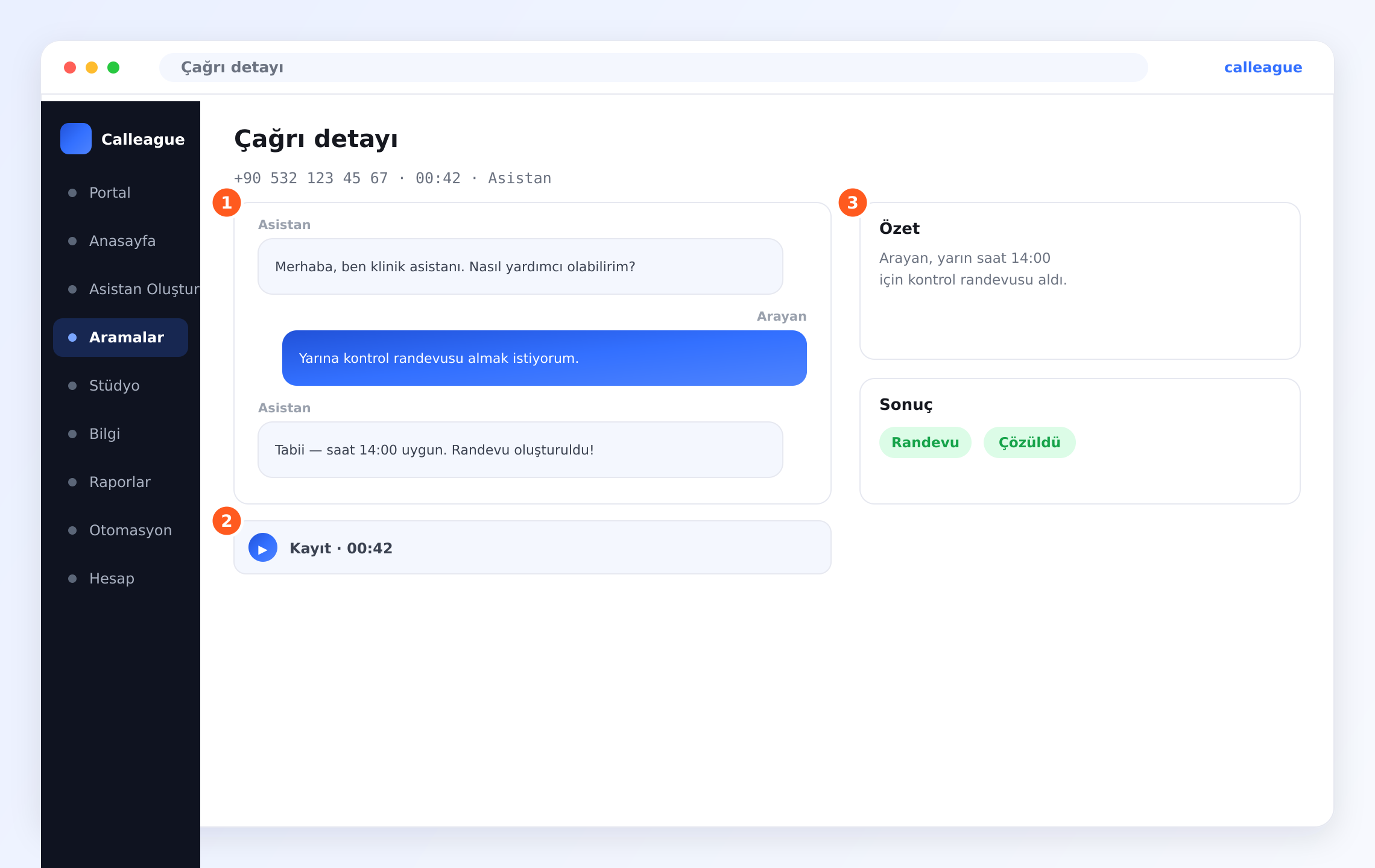
Kaydın dinlemeye hazır olduğunu görürsün. Kayıt çubuğu yoksa, o çağrı için kayıt kapalıydı.
Oynat'a bas
Çağrıyı doğrudan tarayıcında dinlemek için oynat düğmesine tıkla — indirmeye gerek yok.
Çağrının geri çalındığını duyarsın. Yanındaki yazılı döküm, göz gezdirmeni ya da ihtiyacın olan bölüme atlamanı sağlar.
Kayıt ve döküm bir arada yaşadığı için ya sesi dinleyebilir ya da konuşmayı okuyabilirsin — o gün hangisi daha hızlıysa.
Kaydı açmak veya kapatmak
Kayıt, asistanında basit bir aç/kapat seçimidir. Açıkken çağrılar kaydedilir ve ses her Çağrı ayrıntısı sayfasında görünür. Kapalıyken yine yazılı dökümü ve özeti alırsın — yalnızca ses olmaz.
Asistanını aç
Soldaki menüden Asistan Oluştur'a tıklayarak değiştirmek istediğin asistanı aç (ya da listenden aç).
Asistanının ayarlarını görürsün.
Çağrı kaydı ayarını bul
Asistanın ayarlarında açıkça etiketlenmiş kayıt aç/kapat anahtarını ara.
Kaydın şu an açık mı kapalı mı olduğunu görürsün.
Aç ya da kapat, sonra kaydet
Kayıtları tutmak için aç, ses saklamamayı tercih ediyorsan kapat, sonra kaydet.
Seçimin o andan sonraki çağrılara uygulanır. Kontrol sende — istediğin zaman geri al.
| Ayar | Ne yapar | Notlar |
|---|---|---|
| Çağrı kaydı | Asistan için ses kaydını açar veya kapatır | Kapalı = ses saklanmaz; yine döküm ve özet alırsın |
| Karşılamada bildirme | Karşılamanda arayanlara kayıttan söz eden bir cümle | Şiddetle önerilir, çoğu zaman zorunludur |
| Kim dinleyebilir | Hangi ekip arkadaşlarının kayıtları oynatabileceği | Ekip rolleriyle ayarlanır — bkz. Hesap ve ekip |
Lütfen arayanlara kaydedildiklerini söyle
Bu önemli. Türkiye dâhil birçok yerde, bir çağrı kaydedilirken insanlara bunu bildirmen gerekir ve kayıt onların rızasına saygı göstermelidir.
- Asistanının karşılamasında kayıttan söz et, böylece arayan konuşma başlamadan önce bilir. Örneğin: "Size daha iyi hizmet verebilmek için bu çağrı kaydedilebilir."
- Arayanın isteğine saygı göster — yalnızca adil ve yasal olduğunda kaydet.
- Kayıtları yalnızca gerçekten ihtiyacın olduğu sürece sakla, sonra bırak.
Arayanları bilgilendirmek yalnızca nezaket değil — yasanın gereğidir. Calleague KVKK (Türkiye) ve GDPR'ye uyar. Canlı çağrıları kaydetmeden önce, özellikle aramayı sen yapıyorsan, karşılamanın arayanlara kayıttan söz ettiğinden emin ol.
Örnek: küçük bir mali müşavirlik firması
Firma, müşterilerin telefonda söylediği rakamları bir kez daha kontrol edebilmek için çağrıları kaydeder. Karşılamaları şöyle der: "Demir Mali Müşavirlik'e hoş geldiniz. Bu çağrı doğruluk için kaydedilebilir." Yalnızca iki ortak geri dinleyebilir ve kayıtları yalnızca ihtiyaç duydukları kadar saklarlar. Basit, adil ve kuralların doğru tarafında.
Kayıtların güvende tutulur
Kayıtların gizli ve korumalıdır. Güvenli bir şekilde kilitlenir, böylece ulaşmaması gereken kimse tarafından oynatılamaz. Yalnızca sen ve izin verdiğin ekip arkadaşları dinleyebilir — bunu ekip rolleriyle kontrol edersin.
| Kim | Ne yapabilir | Nereden ayarlanır |
|---|---|---|
| Sahip / yönetici | Dinler ve kayıtları yönetir | Ekip ayarları |
| İzin verdiğin ekip üyeleri | Görmelerine izin verilen çağrıları dinler | Ekip ayarlarındaki roller |
| Diğer herkes | Hiçbir erişim yok | — |
Bir şey farklı görünüyorsa
| Ne görüyorsun | Neden olur | Ne yapmalısın |
|---|---|---|
| Bir çağrıda kayıt çubuğu yok | Çağrı olduğunda kayıt kapalıydı | Kaydı aç; o andan sonraki çağrılara uygulanır |
| Kayıt oynatılmıyor | Tarayıcında kısa bir bağlantı aksaması | Sayfayı yenile ve tekrar oynat'a bas |
| Bir ekip arkadaşı kayıtları dinleyemiyor | Rolü kayıt erişimini içermiyor | Rolünü ekip ayarlarından güncelle — bkz. Hesap ve ekip |
| Bir kaydın kaldırılmasını istiyorsun | Artık ihtiyacın yok ya da bir arayan istedi | Kaldır ya da kaldırmamız için bize yaz |
Sık sorulan sorular
Sonraki adımlar
Bir çağrıyı incele
Kaydın yanındaki döküm, özet ve sonuç.
Çağrılarını gör
Gelen ve son çağrıların gelen kutusuna dön.
Gizlilik ve güvenlik
Verilerin nasıl güvende ve gizli tutulur.
Hesap ve ekip
Ekibinden kimin kayıtları dinleyebileceğini ayarla.
Yardıma mı ihtiyacın var? info@arpanet.com.tr adresinden memnuniyetle yardımcı oluruz.
Son güncelleme