
Takım ve faturalama
Ekip arkadaşlarınızı davet edin, herkese doğru rolü verin, kullanımınızı izleyin ve planınızla ödemenizi yönetin — hepsi sade ekranlarda, adım adım takip ederek, hiçbir teknik bilgi gerekmeden.
Burası Calleague'in telefon çağrılarıyla ilgili olmayan iki yanıyla ilgilendiğiniz yer: sizinle çalışan kişiler ve para tarafı — yani planınız, kullanımınız ve ödemeniz. Her şey Hesap menüsünden ulaştığınız sade ekranlarda olur ve istediğiniz an fikrinizi değiştirebilirsiniz.
Bu sayfada neler yapacaksınız
Adım adım bir ekip arkadaşı davet edecek, her rolün neler yapabileceğini öğrenecek, kullanımınızı nerede izleyeceğinizi görecek, Başlangıç / Büyüme / Kurumsal planlarını karşılaştıracak ve ödemenin ile üst plana geçmenin nasıl işlediğini öğreneceksiniz. Okurken kendi hesabınızda da aynı adımları izleyin.
Burada teknik hiçbir şey öğrenmenize gerek yok. E-posta gönderip bir düğmeye basabiliyorsanız, tüm takımınızı ve faturalamanızı kendiniz yönetebilirsiniz.
Roller — kim neyi yapabilir
Rol, bir kişinin neleri görüp neleri değiştirebileceğini belirler. Bunu anahtar dağıtmaya benzetin: kimine her odanın anahtarını verirsiniz, kimine yalnızca bir odanın. Kime hangi anahtarı vereceğinize siz karar verirsiniz ve istediğiniz an değiştirebilirsiniz.
| Rol | Neler yapabilir |
|---|---|
| Sahip | Hesabın asıl sahibi. Plan ve hesabı kapatma dâhil her şey üzerinde tam yetki. Genellikle tek kişidir. |
| Yönetici | Günlük işlerin tamamında tam yetki — asistanlar, telefon numaraları, takım, plan ve ödeme. Bir iş ortağı veya ofis müdürü için idealdir. |
| Üye | Günlük işi yürütür — asistan oluşturur ve düzenler, çağrıları izler, dökümleri okur — ama faturalamaya dokunamaz, kimseyi çıkaramaz. |
| İzleyici | Çağrıları, kayıtları ve raporları görebilir, ama hiçbir şeyi değiştiremez. Henüz öğrenmekte olan biri ya da yalnızca rakamları görmesi gereken bir muhasebeci için biçilmiş kaftandır. |
İpucu: Yeni başlayan bir çalışanı işi öğrenirken İzleyici olarak başlatın, kendine güveni geldikçe Üye'ye yükseltin. İzleyiciyken yaptığı hiçbir şey bir zarar veremez.
Bir ekip arkadaşı davet edin — adım adım
Birini eklemek bir dakikadan kısa sürer. Bu adımları kendi hesabınızda izleyin.
Hesap menüsünü açın
Sol taraftaki koyu menüde Hesap'a tıklayın (listenin en altındaki öğe). Kartlarınızın altındaki Başlangıç kontrol listesi de size Ekip arkadaşı davet et adımını hatırlatır — ⑤ kontrol listesindeki 4. adım.
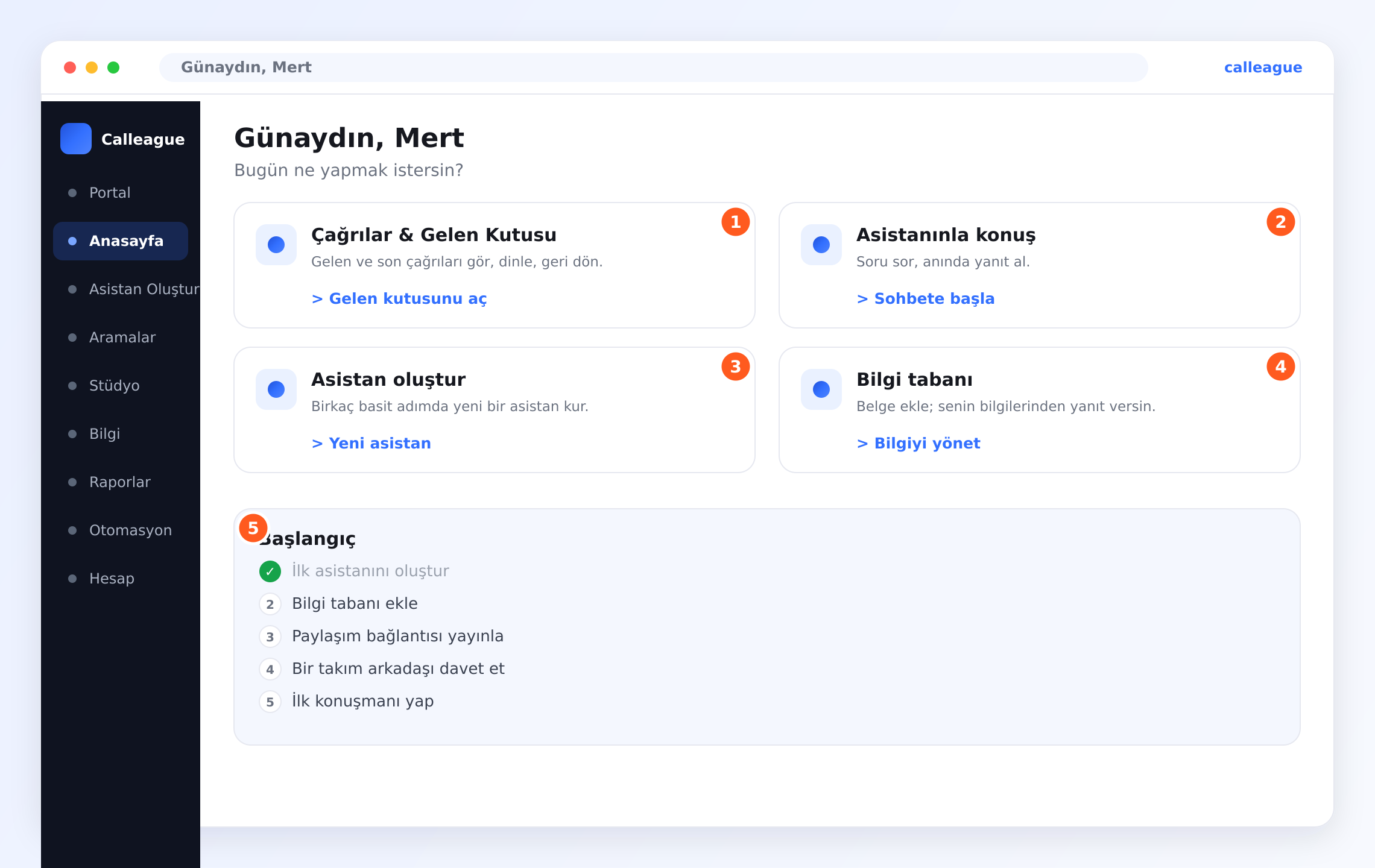
Hesap ayarlarınızın açıldığını ve içinde Takım dâhil bölümlerin listelendiğini görürsünüz.
Takım bölümünü açın
Takım'a tıklayın.
Hâlihazırda erişimi olan herkesi burada, adı, e-postası ve rolüyle birlikte listelenmiş görürsünüz.
Ekip arkadaşı davet et'e tıklayın
Ekip arkadaşı davet et düğmesine tıklayın (genellikle listenin sağ üstündedir).
Birkaç bilgi isteyen küçük bir kutunun açıldığını görürsünüz.
E-posta adresini yazın
Eklemek istediğiniz kişinin e-posta adresini yazın — gerçekten baktığı adresi kullanın, çünkü davet oraya düşer.
Yazdığınız e-postanın kutuda, göndermeye hazır göründüğünü görürsünüz.
Rolünü seçin
Ne kadar yetki vermek istediğinize göre Yönetici, Üye ya da İzleyici seçin. (Emin değilseniz yukarıdaki roller tablosuna bakın.)
Seçtiğiniz rolün vurgulandığını görürsünüz. Merak etmeyin — bunu sonradan değiştirebilirsiniz.
Daveti gönderin
Daveti gönder'e tıklayın.
Yeni kişinin takım listenizde davet edildi olarak göründüğünü görürsünüz. Kişi bağlantılı bir e-posta alır, tıklar, kendi parolasını belirler ve hesabı hazır olur.
Planınızın izin verdiği kadar kişi davet edebilir, biri işten ayrıldığı an erişimini kaldırabilirsiniz.
Birini değiştirmek ya da çıkarmak
Takım ekranında her kişinin adının yanında sade seçenekler bulursunuz:
- Rolü değiştir — birini üst ya da alt role taşıyın (örneğin bir İzleyiciyi Üye yapın).
- Çıkar — erişimini anında kaldırın. Artık giriş yapamaz, ama çağrılarınız, kayıtlarınız ve ayarlarınız olduğu gibi kalır.
Biri işletmenizden ayrıldığında onu hemen çıkarın. Bu, hesabınızı düzenli tutar ve çağrılarınızı yalnızca doğru kişilerin görmesini sağlar.
Kullanımınızı izlemek
Hesap menüsünden kullanım ekranınızı da açabilirsiniz. Asistanlarınızın ne kadar çalıştığını anlaşılır rakamlarla gösterir — örneğin kaç çağrı karşılandığı ve kaç dakika harcandığı gibi. Okunacak teknik bir şey yok; bir bakışta anlayacağınız sayılardan ibaret.
| Göreceğiniz şey | Size ne anlatır |
|---|---|
| Karşılanan çağrılar | Asistanlarınızın kaç çağrıyı yanıtladığı veya başlattığı. |
| Kullanılan dakika | Tüm asistanlarınızdaki toplam konuşma süresi. |
| Bu ayki kullanım | Planınızın ne kadarını kullandığınız ve ne kadarının kaldığı. |
| En yoğun saatler | Telefonlarınızın en çok ne zaman çaldığı — planlama için çok işe yarar. |
Bir diş kliniği, pazartesi sabahı bu ekrana bakıp asistanın hafta sonu kaç randevu çağrısı karşıladığını bir anda görebilir — kimsenin not tutmasına gerek kalmadan.
Planınızı seçmek
Calleague üç boyutta gelir; böylece yalnızca gerçekten ihtiyacınız olan kadarını ödersiniz. Küçük başlayıp hazır olunca büyüyebilirsiniz — üst plana geçmek yalnızca birkaç tıklamadır.
| Özellik | Başlangıç | Büyüme | Kurumsal |
|---|---|---|---|
| Kimler için | Denemek isteyenler ya da az çağrı alan küçük bir dükkân | Daha çok çağrı ve daha çok asistan isteyen yoğun işletmeler | En yüksek kapasiteye ve ek desteğe ihtiyaç duyan büyük şirketler |
| Asistan sayısı | Başlamaya yetecek az sayıda | Daha fazla; farklı işleri kapsayabilirsiniz | İhtiyacınız kadar |
| Çağrı dakikası | Başlangıç paketi | Daha büyük aylık paket | En yüksek kapasite |
| Ekip üyeleri | Birkaç kişi | Daha fazla | Sınırsız |
| Diller | Türkçe dâhil 32 dil | 32 dilin tamamı | 32 dilin tamamı |
| Araçlarınızı bağlama | Var | Var, ek seçeneklerle | Var, kurulumda öncelikli yardımla |
| Destek | Güler yüzlü e-posta desteği | Daha hızlı destek | Size özel bir irtibat kişisi ve kurulum desteği |
Hangi planın size uygun olduğundan emin değil misiniz? Ücretsiz denemeyle başlayın. Ne kadar kullandığınızı kısa sürede anlarsınız ve planınızı her zaman değiştirebilirsiniz — hiçbir şey kalıcı değil.
Ücretsiz deneme
Her hesap bir ücretsiz deneme ile başlar; böylece bir asistan kurabilir, birkaç çağrı alabilir ve hiçbir ödeme yapmadan Calleague'in işletmeniz için çalıştığını görebilirsiniz. Deneme bitince devam etmek için bir plan seçmeniz yeter. Asistanlarınız ve ayarlarınız sizi bekliyor olur — sıfırdan başlamazsınız.
Ödeme yapmak — adım adım
Ödeme hızlı ve alıştığınız gibidir — tıpkı herhangi bir alışveriş sitesi gibi. Türkiye ödeme yöntemleri tümüyle desteklenir; alıştığınız şekilde ödersiniz.
Hesap menüsünü açıp faturalamaya gidin
Sol menüde Hesap'a tıklayın, ardından faturalama bölümünü açın.
Mevcut planınızı ve onu seçmek ya da değiştirmek için bir düğme görürsünüz.
İstediğiniz planı seçin
Başlangıç, Büyüme ya da Kurumsal'ı ve aylık mı yıllık mı ödemek istediğinizi seçin.
Nelerin dâhil olduğunu ve ne tutacağını gösteren açık bir özet görürsünüz.
Ödeme bilgilerinizi girin
Güvenli ödeme ekranında kart bilgilerinizi yazın. Türkiye ödeme yöntemleri tümüyle desteklenir.
Bilgilerinizin kabul edildiğine dair bir onay görürsünüz.
Onaylayın
Planı onaylayın.
Yeni planınızın hemen etkinleştiğini ve ilk faturanızın faturalama alanında göründüğünü görürsünüz.
Faturalarınızın tamamı faturalama alanında saklanır; istediğiniz an ulaşabilirsiniz — muhasebeciniz için, kendi kayıtlarınız için ya da vergi zamanı.
Ödeme bilgileriniz güvenli bir ekranda işlenir ve gizli tutulur. Calleague kart numaranızın tamamını size geri göstermez ve kartınızı istediğiniz an değiştirip kaldırabilirsiniz.
Üst ya da alt plana geçmek
İşletmeniz yıl içinde değişir; planınız da onunla birlikte değişebilir.
- Üst plana geçmek (daha büyük bir plana çıkmak) hemen geçerli olur; ek çağrılara, asistanlara veya kontenjana anında kavuşursunuz.
- Alt plana geçmek (daha küçük bir plana inmek) genellikle bir sonraki faturalama tarihinde geçerli olur; o güne kadar ödediğinizin karşılığını kullanmaya devam edersiniz.
Onaylamadan önce neyin değişeceğini ve ne tutacağını her zaman açık bir özette görürsünüz — tahmin yürütmek yok.
Yoğun bir döneme mi giriyorsunuz — bayram telaşı, büyük bir kampanya? O aylar için üst plana geçin, sonra geri inin. Hiçbir zaman tek bir plana bağlı kalmazsınız.
Gerçek örnekler
Küçük bir diş kliniği. Sahibi, resepsiyon görevlisini Üye olarak davet eder; böylece çağrıları dinleyip randevuları düzenleyebilir. Muhasebeciyi ise İzleyici yapar; ay sonunda kullanımı görebilir ama hiçbir şeyi değiştiremez. Deneme süresince Başlangıç ile başlar, asistan hafta sonu randevuları rahatça aldığında Büyüme'ye geçerler.
Mahalle dükkânı. Calleague'i yalnızca sahibi kullanır, Başlangıç planında. Her pazartesi kullanım ekranına bakıp asistanın kaç tane "açık mısınız?" ve "bunda stoğunuz var mı?" çağrısı karşıladığını görür, aylık faturasını her zamanki Türk kartıyla öder.
Bir şey farklı görünüyorsa
| Gördüğünüz şey | Nedeni | Ne yapmalı |
|---|---|---|
| Takım'ı bulamıyorsunuz | Yanlış ekranda olabilirsiniz | Önce sol menüde Hesap'a tıklayın, sonra Takım'ı arayın. |
| Bir ekip arkadaşı davetini almadı | E-posta spam'e düştü ya da adreste yazım hatası var | Spam klasörünü kontrol etmesini isteyin ya da doğru adrese daveti yeniden gönderin. |
| Bir ekip arkadaşı bir şeyi değiştiremiyor | İzleyici ya da Üye rolünde | Takım'ı açın, adını bulun ve daha fazla yetki gerekiyorsa rolünü Yönetici yapın. |
| "Denemeniz sona erdi" mesajı | Ücretsiz deneme süresi bitti | Faturalama bölümünü açıp asistanlarınızı çalışır tutacak bir plan seçin. |
| Bir ödeme geçmedi | Kart reddedildi, süresi doldu ya da limite takıldı | Ödeme yönteminizi güncelleyip tekrar deneyin ya da bankanıza danışın. |
| Daha fazla kişi davet edemiyorsunuz | Planınızdaki tüm kontenjanı kullandınız | Daha çok ekip üyesi eklemek için üst plana geçin. |
Ödemeyle ilgili bir şey ters görünüyorsa — tanımadığınız bir tahsilat ya da değişmeyen bir plan gibi — endişelenmeyin ve ikinci kez denemeyin. info@arpanet.com.tr adresine yazın; gerçek bir insan sizinle birlikte çözer.
Sık sorulanlar
Kısa bir özet
- Ekip arkadaşlarınızı Hesap → Takım'dan davet edin ve her birine doğru rolü verin — Yönetici, Üye ya da İzleyici.
- Kullanımınızı izleyin ki faturada sürpriz olmasın.
- Bir plan seçin — ücretsiz denemeyle başlayın, sonra Başlangıç, Büyüme ya da Kurumsal'ı seçin.
- Türkiye ödeme yöntemleriyle kolayca ödeyin ve her faturayı tek bir yerde tutun.
- İşletmeniz değiştikçe üst ya da alt plana geçin.
Bunlardan herhangi biriyle ilgili yardıma mı ihtiyacınız var? İstediğiniz zaman info@arpanet.com.tr adresinden bize ulaşın; gerçek bir insan size yardımcı olur. Calleague, Ankara'da Arpanet Bilişim Teknolojileri A.Ş. tarafından geliştirilir ve verileriniz hem KVKK hem GDPR kapsamında gizli tutulur.
Sonraki adımlar
Verileriniz güvende
Calleague çağrılarınızı ve müşteri bilgilerinizi nasıl gizli tutar.
İlk asistanınızı oluşturun
Sizin yerinize çağrı yanıtlayıp arayan bir asistan kurun.
Araçlarınızı bağlayın
Asistanınız randevu alsın ve bilgileri sizin için araştırsın.
Yardım ve SSS
En sık sorulan soruların kısa yanıtları.
Son güncelleme