
Geliştiriciler
Calleague'in barındırılan uygulama API'siyle kendi yazılımınızı geliştirin — çağrı başlatın ve inceleyin, asistanlarınızı okuyun, çağrı olaylarına tepki verin ve MCP istemcilerine bağlanın. API anahtarı, Bearer kimlik doğrulama ve gerçek bir örnek.
Calleague uygulaması size sade bir web API'si sunar; böylece ekibinizin panoda elle yaptığı her şeyi kendi kodunuzdan da yapabilirsiniz. Bir kişi sesli asistanı çalıştırıp çağrı başlatabiliyor ve sonucu görebiliyorsa, yazılımınız da aynısını yapabilir — ve Calleague'i doğrudan dükkanınızın sipariş sistemine, bir kliniğin randevu aracına ya da hâlihazırda kullandığınız herhangi bir arka ofis uygulamasına bağlayabilirsiniz.
Bu bölümdeki her şey uygulama düzeyindedir. Bir API anahtarıyla giriş yapar, güvenli (HTTPS) bir bağlantı üzerinden düz JSON gönderip alır ve isteğe bağlı olarak Calleague'in size olay göndermesine veya MCP uyumlu araçlarla konuşmasına izin verirsiniz. Kurulacak hiçbir şey yoktur.
Bu bölüm kod yazan kişiler içindir. Belgelerin geri kalanı hiçbir teknik bilgi gerektirmez — ilk kez bir asistan kuruyorsanız bunun yerine Başlangıç ile başlayın.
Ne yapacaksınız
Bir API anahtarı alacak, çağrı başlatmak için tek bir istek gönderecek ve sonucu JSON olarak geri okuyacaksınız. Aşağıdaki örnek, ekran görüntüsünde gösterilen gerçek istek ve yanıttır; kopyalayıp kendi asistanınıza uyarlayabilirsiniz.
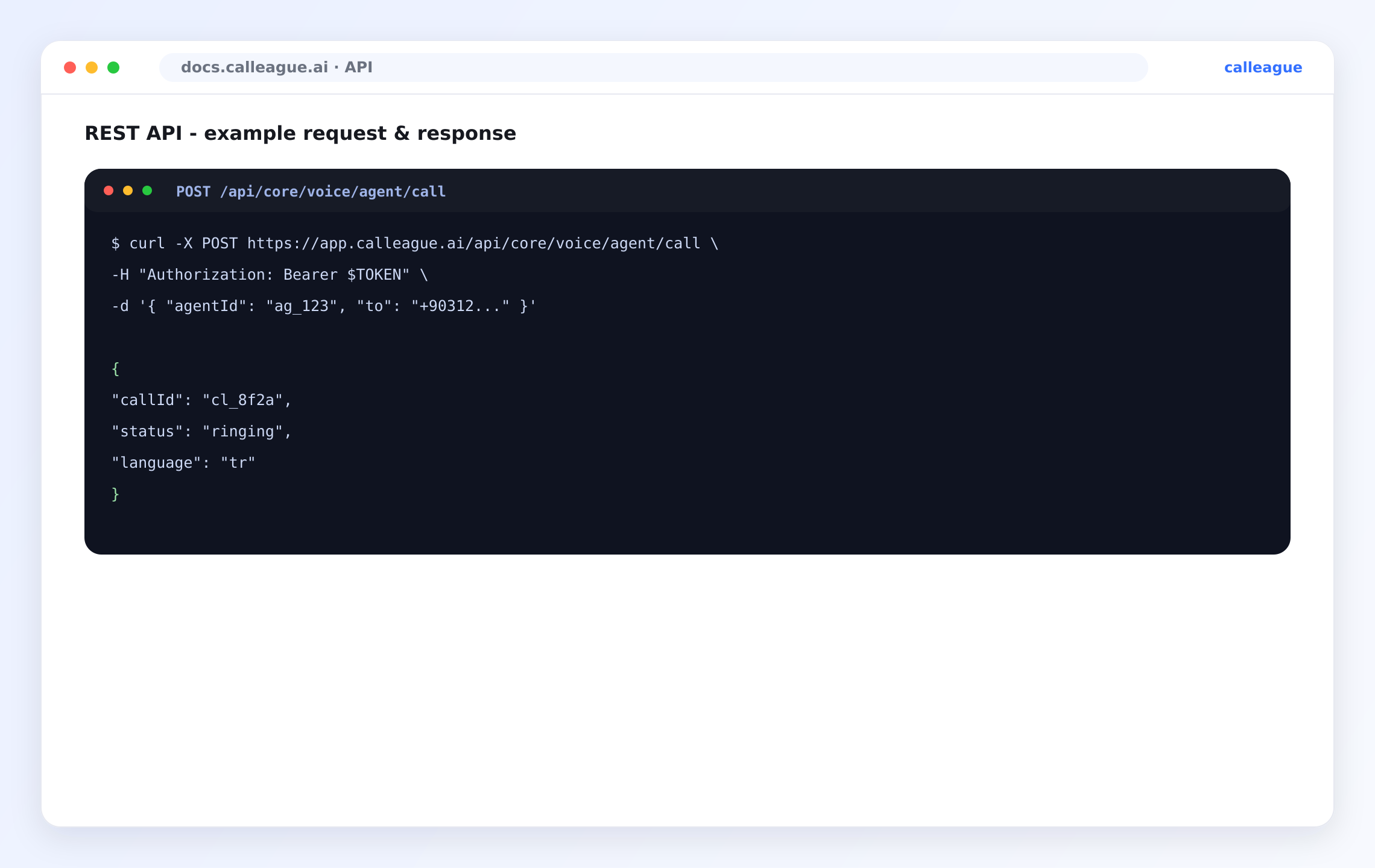
Ekran görüntüsü tüm gidiş gelişi gösterir: asistanınızın kimliği ve bir telefon numarasıyla /api/core/voice/agent/call adresine bir POST ve yanıt olarak yeni çağrının kimliğini, durumunu ve konuşacağı dili içeren bir JSON yanıtı.
Neler geliştirebilirsiniz
| Yetenek | Ne sağlar | Nerede |
|---|---|---|
| Çağrılar | Giden çağrı başlatın, sonra nasıl geçtiğine bakın. | REST API |
| Asistanlar | Hangi asistanla arama yapacağınızı bilmek için sesli asistanlarınızı okuyun. | REST API |
| Dökümler ve kayıtlar | Çağrı bittiğinde konuşulan sözleri ve kayıt referansını çekin. | REST API |
| Olaylar | Bir çağrı başladığı, bittiği veya kayıt hazır olduğu anda haberdar olun — sürekli kontrol etmeden. | Webhook |
| Araçlar (MCP) | Bir asistanın görüşme sırasında araçlarınızı çağırmasına ya da dış bir asistanın Calleague'e erişmesine izin verin. | MCP |
Bir API anahtarı, onu oluşturan hesabın izinlerini devralır. Panoda yapamadığınız bir şeyi anahtar da yapamaz — yani bir anahtar, onu oluşturan kişiden asla daha yetkili değildir.
Temel adres
Her istek, güvenli bir bağlantı üzerinden Calleague çalışma alanınıza gider. Ekran görüntüsündeki adres herkese açık olanıdır:
https://app.calleague.aiBu sayfalardaki tüm çağrılar, bu adresin ardından /api/... ile başlar. İstekler ve yanıtlar JSON biçimindedir.
Kimlik doğrulama
Kim olduğunuzu, standart Authorization başlığında Bearer token olarak gönderilen bir API anahtarı ile kanıtlarsınız — tıpkı ekran görüntüsündeki gibi:
Authorization: Bearer $TOKENAnahtarları uygulamadaki hesap ayarlarınızdan oluşturur, adlandırır ve iptal edersiniz.
Hesap ayarlarınızı açın ve bir anahtar oluşturun
Hesap ayarlarınıza gidin ve API anahtarları alanını açın, ardından yeni bir anahtar oluşturun. Ne için olduğunu söyleyen bir ad verin; örneğin dukkan-siparis veya klinik-hatirlatma, böylece sonradan tanıyıp iptal edebilirsiniz.
Yeni anahtarı bir kez, tam haliyle göreceksiniz.
Kopyalayın ve güvenle saklayın
Anahtar ekrandayken kopyalayın — tam hali yalnızca oluşturma anında gösterilir. Kendi güvenli saklama alanınızda tutun. Bir sohbete, paylaşılan bir belgeye veya kod deponuza asla yapıştırmayın.
Listeye sonra dönerseniz yalnızca maskelenmiş bir önizleme görürsünüz; bu normaldir.
Her istekle birlikte gönderin
Anahtarı her istekte Bearer token olarak ekleyin; tıpkı ekran görüntüsündeki Authorization: Bearer $TOKEN satırı gibi.
Anahtar kabul edildiğinde normal bir JSON yanıtı alırsınız; eksik veya yanlışsa 401 alırsınız.
Bir API anahtarına parola gibi davranın. Kendi güvenli saklama alanınızda tutun, asla bir kod deposuna eklemeyin ve açığa çıkarsa hemen değiştirin. Bu sayfalardaki değerler (ag_123, cl_8f2a, $TOKEN) örnek amaçlıdır — gerçek anahtar değildir.
Hızlı başlangıç — çağrı başlatma
Çalışan bir entegrasyona giden en kısa yol tek bir istektir: bir asistandan bir numarayı aramasını isteyin. Bu, ekran görüntüsündeki istek ve yanıtın aynısıdır.
curl -X POST https://app.calleague.ai/api/core/voice/agent/call \
  -H "Authorization: Bearer $TOKEN" \
  -H "Content-Type: application/json" \
  -d '{ "agentId": "ag_123", "to": "+90312..." }'
Başarılı bir başlatma, yeni çağrının kimliğini, durumunu ve konuşacağı dili döndürür:
{
  "callId": "cl_8f2a",
  "status": "ringing",
  "language": "tr"
}
Burada agentId asistanınızın kimliği, to aranacak numara, callId çağrıyı sonra aramak için kullandığınız tutamaç, status ise çağrı ilerledikçe ringing'den in-progress'e ve completed'e geçen durumdur.
Savunmacı yazın: bildiğiniz alanları okuyun, tanımadığınız alanları yok sayın (böylece yenileri güvenle eklenebilir) ve bir değeri kullanmadan önce var olduğunu kontrol edin. Bu tek alışkanlık, en sık görülen entegrasyon hatalarını önler.
Tipik bir akış
Çoğu entegrasyon üç yapı taşını birleştirir — "bir çağrı başlat, bitmesini bekle, sonra dökümü kaydet":
Çağrıyı başlatın (REST)
Bir agentId ve bir to numarasıyla POST /api/core/voice/agent/call gönderin. Karşılığında tutabileceğiniz bir callId alırsınız.
Bitmesini bekleyin (webhook)
call.completed ve recording.ready olaylarına abone olun. Calleague, çağrı biter bitmez bir olay gönderir; böylece sürekli sormak yerine haberdar edilirsiniz.
Sonucu çekin (REST)
Olay geldiğinde, çağrıyı callId ile arayıp sonucunu, dökümünü ve kayıt referansını okuyun ve kendi kaydınıza işleyin.
Uç noktalara genel bakış
En sık kullanılan işlemlerin kısa bir haritası. İlk satır ekran görüntüsündeki gerçek uç noktadır; tam ayrıntı için REST API sayfasına bakın.
| Yöntem | Yol | Amaç |
|---|---|---|
POST | /api/core/voice/agent/call | Bir asistanla giden çağrı başlatın. |
GET | /api/core/voice/call/{callId} | Bir çağrının ayrıntısına ve sonucuna bakın. |
GET | /api/core/voice/call/list | Son çağrıları listeleyin (sayfalı). |
GET | /api/core/voice/agent/list | Sesli asistanlarınızı listeleyin. |
POST | /api/core/webhook | Bir webhook uç noktası kaydedin. |
Bir entegrasyon yöntemi seçmek
| Şunu istiyorsanız… | Kullanın | Sayfa |
|---|---|---|
| Çağrıları ve asistanları istek üzerine tetikleyip sorgulamak | REST API | REST API |
| Bir çağrı olayı olduğu anda tepki vermek | Webhook | Webhook |
| Bir asistanın araçlarınızı çağırmasına ya da Calleague araçlarını dışa açmaya | MCP | MCP |
Bir şey farklı görünüyorsa
| Gördüğünüz | Nedeni | Ne yapmalısınız |
|---|---|---|
Her istekte 401 | Anahtar eksik, yanlış yazılmış veya iptal edilmiş | Authorization: Bearer satırını ve anahtarın etkin olduğunu kontrol edin |
| Anahtarınız tam görünmüyor | Onu oluşturduktan sonra görüntülüyorsunuz | Anahtarlar tam haliyle yalnızca bir kez gösterilir — kaybettiyseniz yeni bir tane oluşturun |
| Yanıtta tanımadığınız alanlar var | API yeni bir alan kazandı | Tanımadığınız alanları yok sayın; yalnızca ihtiyacınız olanı okuyun |
| Bir liste boş geliyor | Henüz eşleşen veri yok | Boş listeyi normal kabul edin ve döngüden önce boş bir diziye düşün |
Sık sorulan sorular
Sırada ne var
Son güncelleme