
Yardım ve SSS
Calleague'i kullanmaya başlamadan önce ve sonra en çok sorulan soruların sade yanıtları — teknik bilgi gerektirmez, hepsi uygulamada gerçekten göreceğiniz ekran ve düğmelere dayalıdır.
Hoş geldiniz — bu sayfayı yer imlerinize ekleyin. En sık duyduğumuz soruları topladık ve hepsini gündelik bir dille, uygulamada göreceğiniz tam o ekran ve düğmelerle yanıtladık. Teknik hiçbir bilgiye gerek yok: telefon kullanabiliyor ve bir web sayfasında basit bir formu doldurabiliyorsanız, bu sayfayı tek başınıza okuyup uygulayabilirsiniz.
Başlamadan önce: Buradaki adımları uygulamak için bir Calleague hesabınızın olması ve giriş yapmış olmanız gerekir. Hesabınız yok mu veya nasıl gireceğinizden emin değil misiniz? Önce Başlangıç sayfasındaki "Giriş yapın" bölümünü okuyun — oradan birkaç dakikada içeri girersiniz. Bu sayfada da hemen aşağıda, Başlarken bölümünde adım adım anlatıyoruz.
Calleague'i; müşterilerinizle sohbet eden, telefonunuza yanıt veren ve işletmenizin bildiklerini hatırlayan güler yüzlü bir yardımcı olarak düşünün. Onu bir kez app.calleague.ai adresinde (uygulamanın açıldığı web adresi) kurarsınız, o günden sonra ona söylediğiniz şekilde çalışır.
Bu sayfada neler var
İlk olarak nereye bakacağınızı bilesiniz diye, soru gruplarının kısa bir haritası.
| Grup | Neyi yanıtlar | Kimin için |
|---|---|---|
| Başlarken | Hesap açma, giriş yapma, ilk ekran | Yeni başlayanlar |
| Asistanınız | 4 adımlık sihirbaz: oluşturma, eğitme, test, yayına alma | İlk yardımcınızı kurma |
| Aramalar ve numaralar | Telefon numarası bağlama, aramaları görme, kayıt ve döküm | Telefonla çalışmak isteyenler |
| Bilgi | Asistana web sitesi ve belgelerle bilgi öğretme | Doğru yanıtlar almak |
| Veri ve gizlilik | Kayıtlar, kimin neyi göreceği, KVKK ve GDPR | Müşteri verisiyle çalışan herkes |
| Planlar ve faturalama | Ücretsiz deneme, planlar, ödeme, ekip davet etme | Sahipler ve finans |
| Mini sözlük | Teknik kelimelerin sade karşılıkları | Bir kelimeye takılan herkes |
Yeni misiniz? En hızlı kendine güven yolu şu: tek bir asistan oluşturun, biraz bilgi ekleyin ve ilk sohbetinizi yapın. Asistanın yanıt verdiğini bir kez gördüğünüzde diğer her şey yerine oturur.
Nasıl yardım alırım
Biz gerçek bir ekibiz ve sizden haber almayı seviyoruz. Bir şey net değilse ya da çalışmıyorsa bize yazın — takılıp kalmanız yerine sormanızı tercih ederiz.
| Kanal | Ne için | Yanıt |
|---|---|---|
| E-posta — info@arpanet.com.tr | Her türlü soru, sorun veya istek | Türkçe veya İngilizce, mümkün olan en kısa sürede |
| Uygulama içi yardım | Çalışırken hızlı ipuçları | Tam bulunduğunuz yerde |
| Bu SSS | En sık sorulan sorular, her an | Anında — beklemeden |
Calleague, Ankara, Türkiye'de Arpanet Bilişim Teknolojileri A.Ş. tarafından geliştirilmektedir.
En hızlı yanıtı almak için
Küçük bir ayrıntı, sorunu üç yerine tek yanıtta çözmemize yardımcı olur. İşte en hızlı yol.
Ne yapmaya çalıştığınızı söyleyin
Örneğin: "Sihirbazın Eğit adımındaydım, web sitemi eklemeye çalışıyordum." Tek cümle yeterli.
Bunun yerine ne olduğunu söyleyin
Ekranda ne gördünüz? "Şu yazı çıktı..." veya "düğme çalışmadı" gibi bir cümle bize çok şey anlatır. İsterseniz ekranın fotoğrafını da çekip ekleyin.
Arama ile ilgiliyse saati ve numarayı ekleyin
Bir telefon görüşmesiyle ilgiliyse, yaklaşık saat ve ilgili numara, görüşmeyi Arama Geçmişi sekmesinde (ekranın üstündeki başlık düğmeleri) hızlıca bulmamızı sağlar.
info@arpanet.com.tr adresine yazın
Bu ayrıntıları info@arpanet.com.tr adresine gönderin, gerisini biz halledelim.
Lütfen bize asla parolanızı veya tam ödeme kartı numaranızı e-postayla göndermeyin. Bunları asla istemeyiz ve yardım etmemiz için paylaşmanıza gerek yoktur.
Başlarken
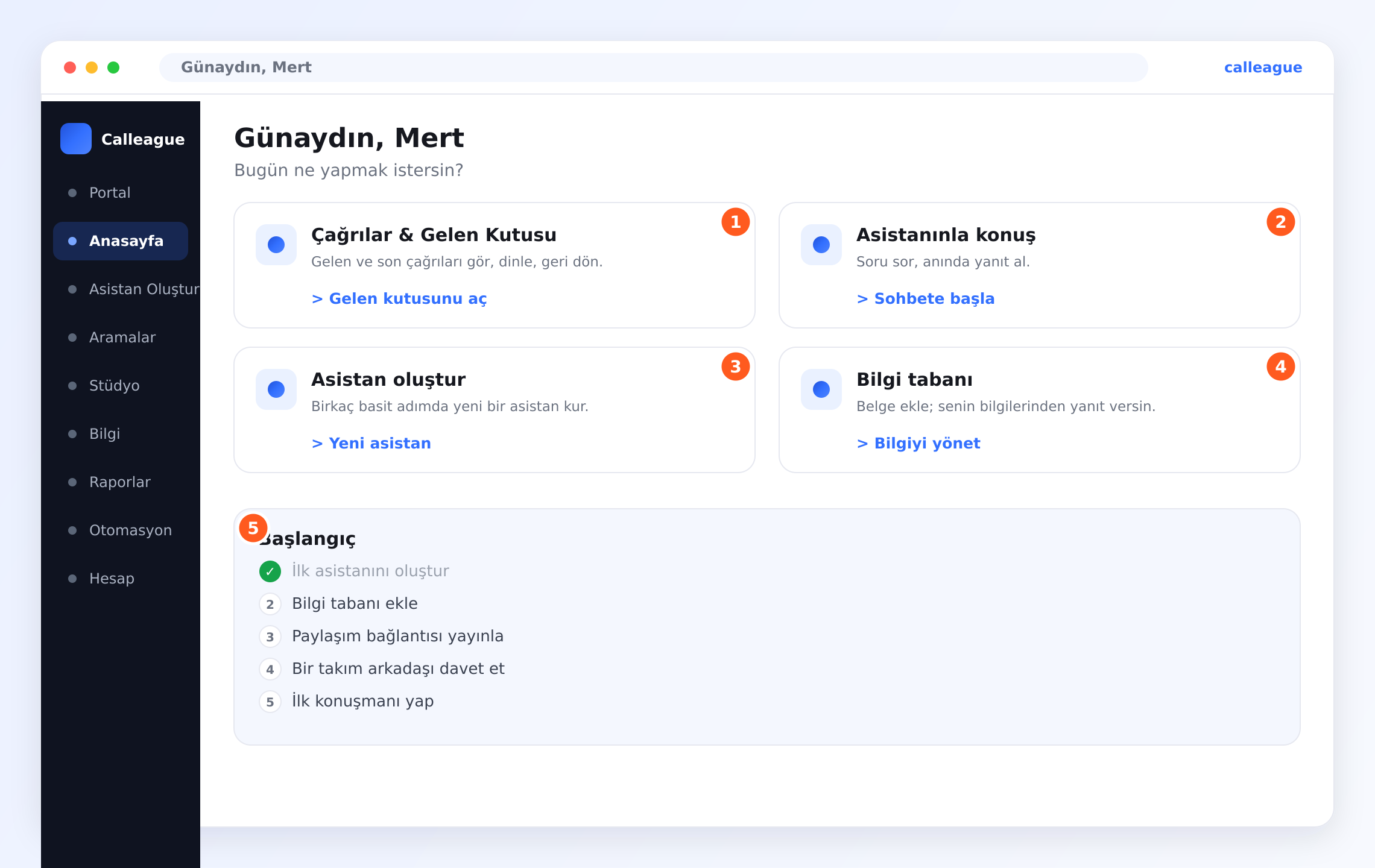
Calleague'e tarayıcınızdan girilir; bilgisayarınıza ya da telefonunuza kurmanız gereken bir program yoktur.
Asistanınız
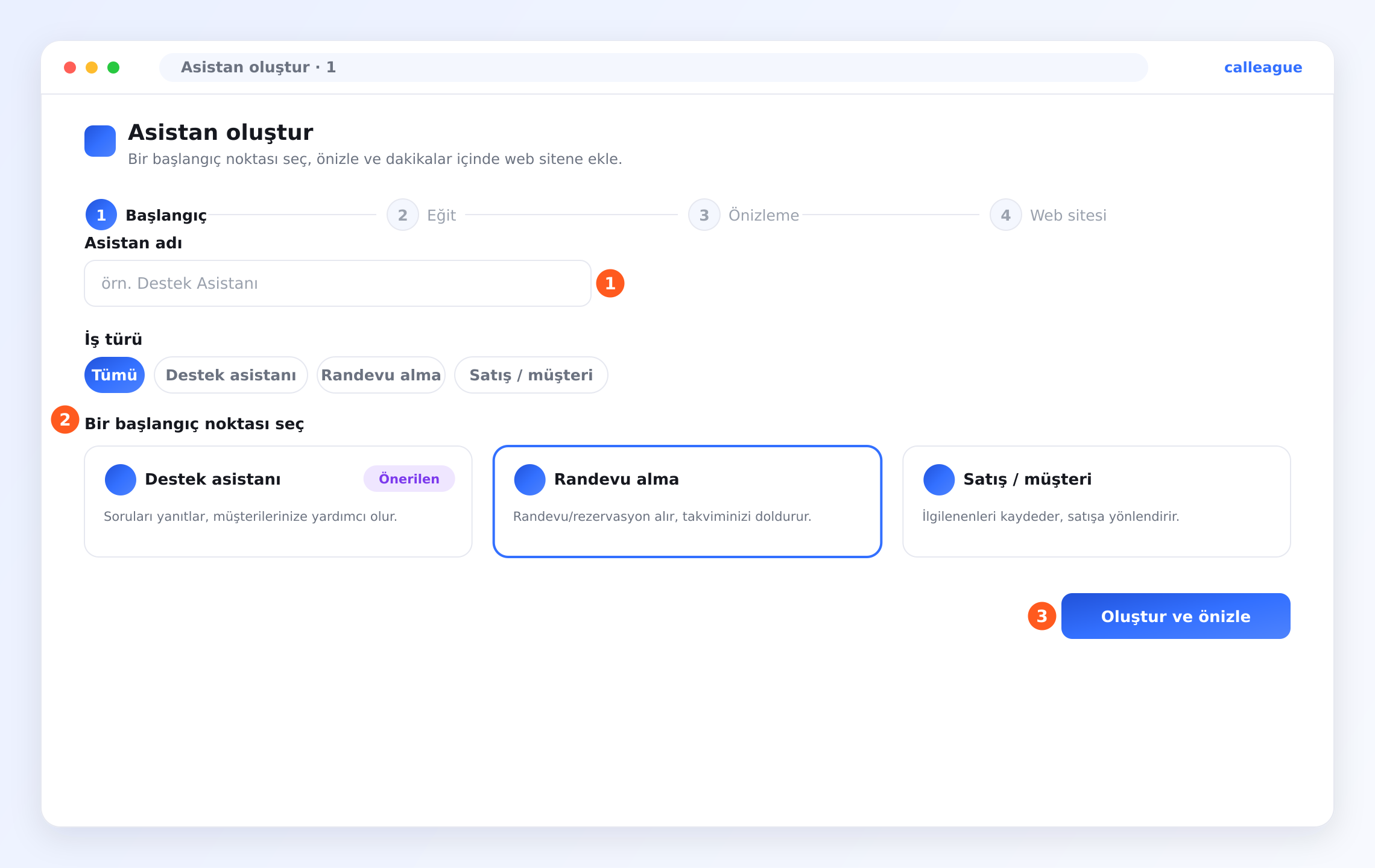
Asistan oluşturmak, sizi elinizden tutarak yönlendiren bir sihirbazdır (adım adım yönlendiren ekran). Dört adımı vardır: Başlangıç → Eğit → Önizleme → Web sitesi. Aşağıda dördünü de görsellerle gösteriyoruz.
Web siteniz yok mu? Sorun değil. Asistanınızı kullanmak için web sitesi şart değildir. Calleague, asistanı oluşturduğunuzda kendiliğinden hazır bir Paylaşım Bağlantısı (müşterilere gönderdiğiniz hazır sohbet linki) üretir — "Bağlantıyı kopyala" ile alıp WhatsApp, Instagram ya da SMS ile müşterilerinize gönderirsiniz. İsterseniz sol menüdeki Portal'dan asistanı doğrudan kendiniz de kullanırsınız; ayrıca asistanınız telefonla da çalışır. Yani aşağıdaki "Web sitesi" adımını atlayabilirsiniz. (Adım adım yol için aşağıdaki "Web sitesi olmadan asistanımı kullanabilir miyim?" sorusuna bakın.)
1) Başlangıç — adını verin, hazır şablonu seçin
"Asistan adı" kutusuna asistanınıza bir ad yazın (örneğin Destek Asistanı). İsterseniz üstteki iş türü satırından ("Tümü", "Destek asistanı", "Randevu alma", "Satış / müşteri") bir tür seçip kartları daraltabilir, sonra bir kart seçebilirsiniz. Sonra ekrandaki üç başlangıç noktasından birini seçin — "Destek asistanı", "Randevu alma" ya da "Satış / müşteri". İşinize en yakın başlangıç noktasını seçin (ör. randevu alan bir iş için "Randevu alma"). Tam sektörünüz yoksa endişelenmeyin — en yakınını seçin, sonra kendi bilgilerinizle özelleştirirsiniz; her şeyi sonradan değiştirebilirsiniz. Hazır olunca "Oluştur ve önizle" düğmesine basın.
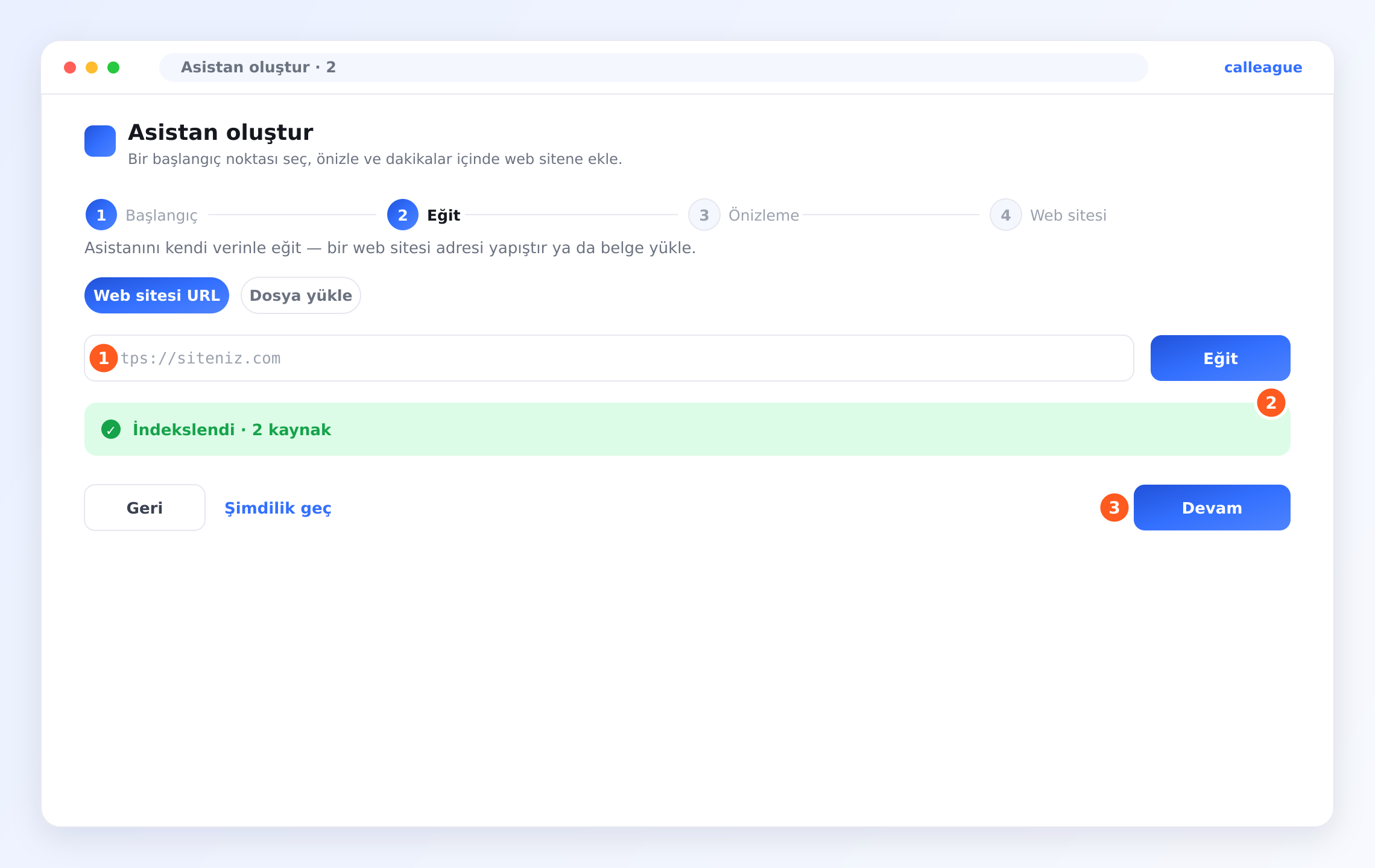
2) Eğit — işletmenizi tanıtın
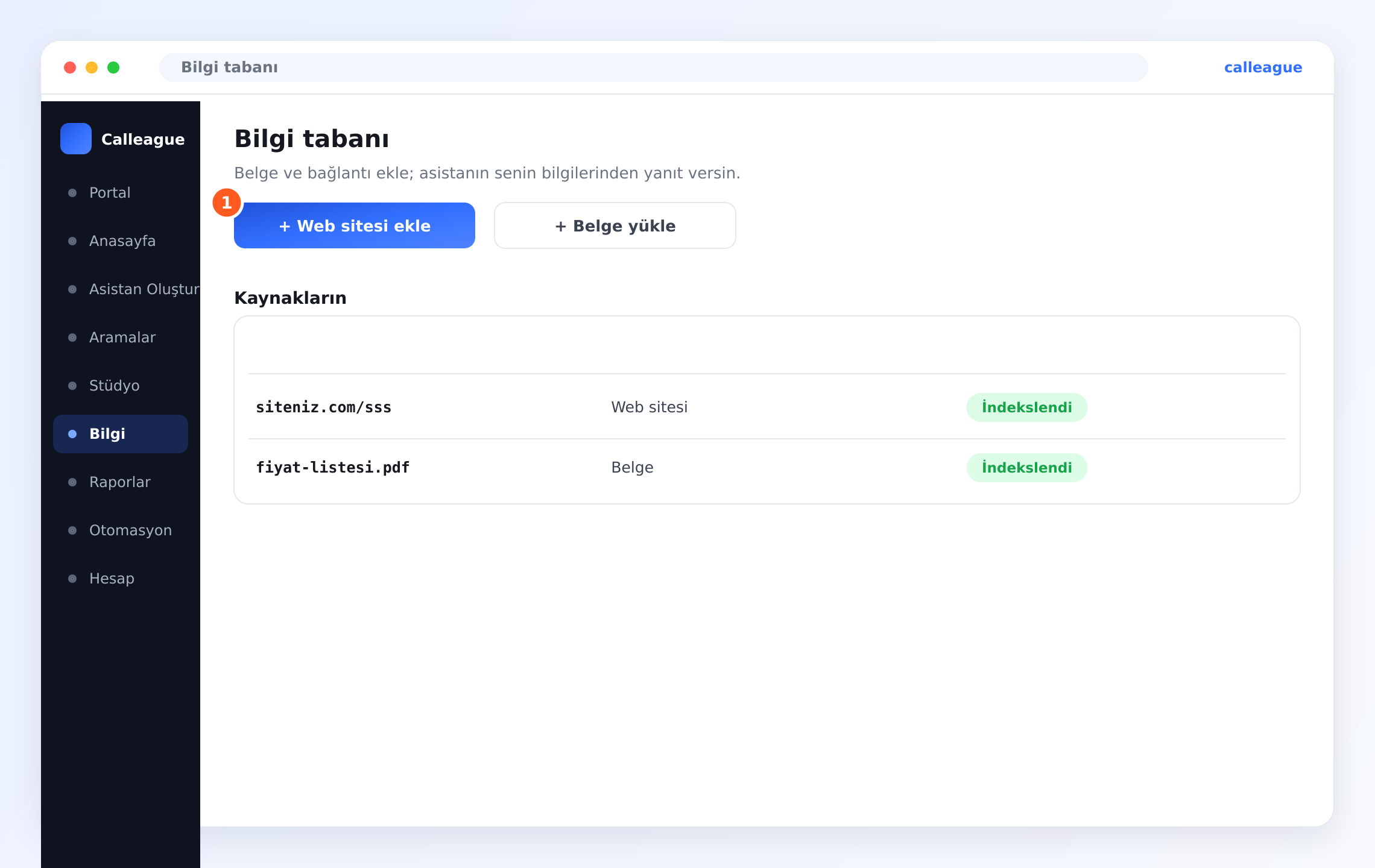
Burada asistanınıza işletmenizi öğretirsiniz. İki kolay seçenek var: "Web sitesi URL" kutusuna web adresinizi (ör. www.isiniz.com) yapıştırın, ya da "Dosya yükle" sekmesiyle bir belge ekleyin. Telefondaysanız fotoğraf/JPG de yükleyebilirsiniz — menünüz veya broşürünüz fotoğraf hâlindeyse olduğu gibi yükleyin. Eklediğiniz her şey "Kaynakların" listesinde görünür. Asistan bilgiyi okuyunca ekranda "İndekslendi" (yani: okudu, artık biliyor) yazısını görürsünüz; ardından **"Devam"**a basın. Acelesi yoksa "Şimdilik geç" diyip bilgiyi sonra da ekleyebilirsiniz.
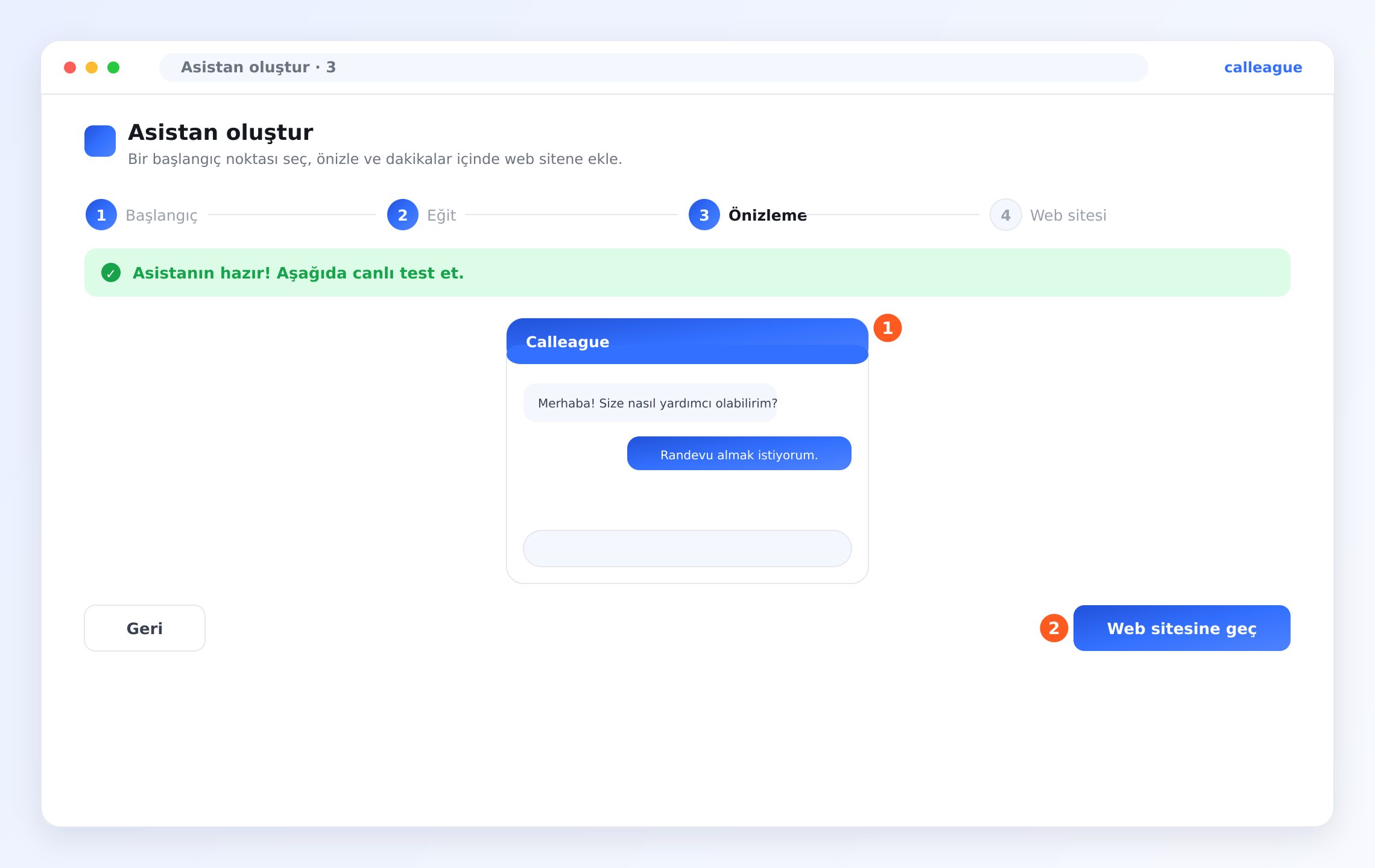
3) Önizleme — müşteriler görmeden önce kendiniz deneyin
Karşınıza canlı bir sohbet kutusu çıkar. Bir müşterinin sorabileceği gerçek bir soruyu yazın ve nasıl yanıt verdiğini izleyin. Beğendiyseniz **"Web sitesine geç"**e basın. Bir yanıt tam doğru değilse, 2. adıma dönüp daha fazla bilgi ekleyip tekrar deneyin.
4) Web sitesi — yayına alın (ya da bağlantıyı paylaşın)
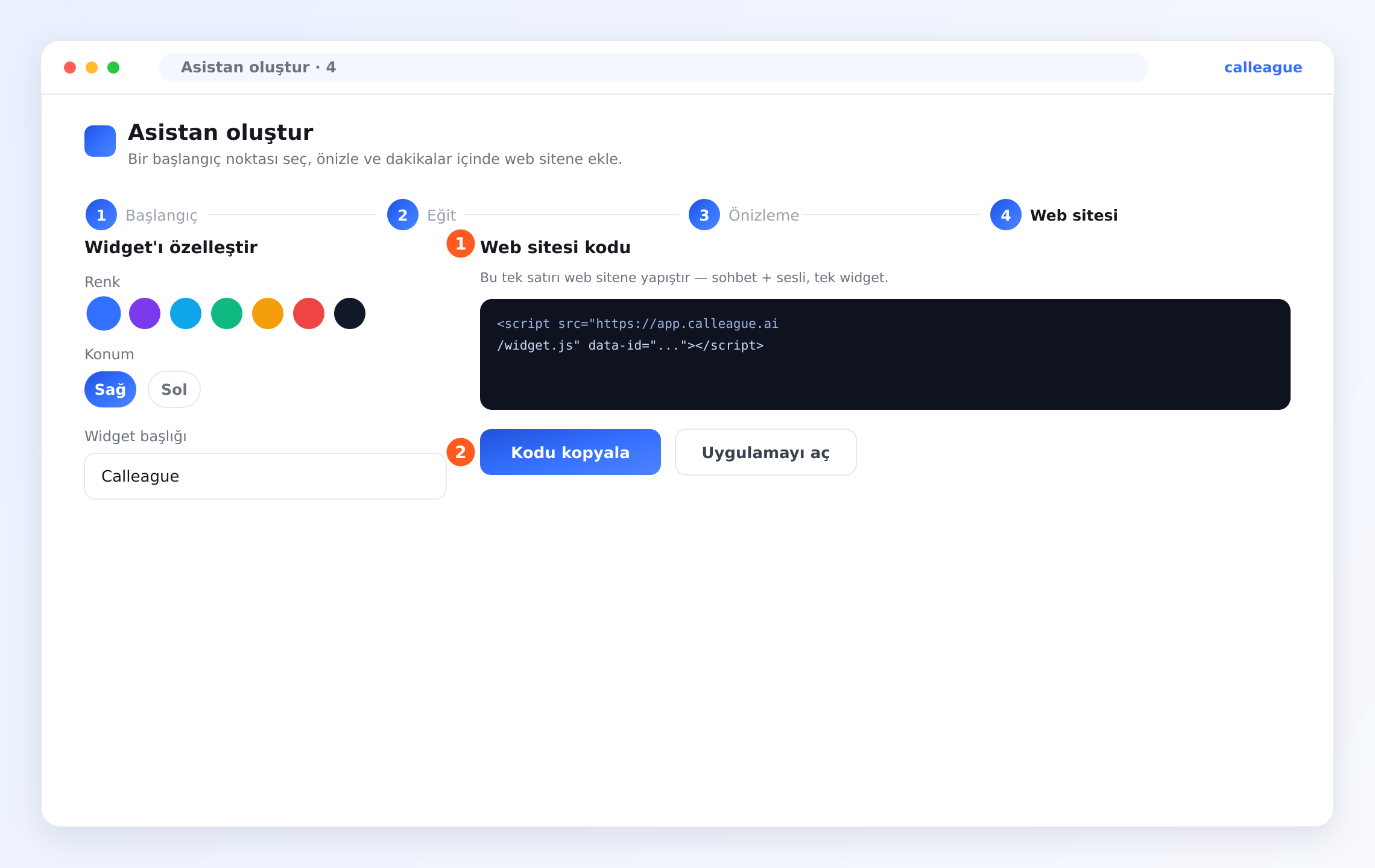
Önce görünümü ayarlarsınız: "Widget'ı özelleştir" ile Renk, Konum (Sağ veya Sol) ve **"Widget başlığı"**nı seçin. (Widget, web sitenizin köşesinde çıkan küçük sohbet balonudur.)
Ardından "Web sitesi kodu" alanında tek satırlık bir kod görürsünüz. "Kodu kopyala" düğmesiyle kopyalarsınız; ipucu olarak şunu söyler: "Bu tek satırı web sitene yapıştır — sohbet + sesli, tek widget."
Bu kodu anlamanıza GEREK YOK. Tek yapacağınız işi: kopyalayıp yapıştırmak. Sitenizi siz yapmadıysanız bu satırı sitenizi yöneten kişiye gönderin — aşağıdaki "Web sitesine kendim ekleyemiyorum" sorusunda hazır bir e-posta şablonu var, doldurup göndermeniz yeterli.
Web siteniz yoksa bu adımı atlayın: "Uygulamayı aç" ile asistanı doğrudan kullanın ya da Paylaşım Bağlantısı'nı (asistan oluşturulunca otomatik üretilen hazır sohbet linki — "Bağlantıyı kopyala" ile alıp WhatsApp/Instagram/SMS ile gönderirsiniz) müşterilerinizle paylaşın. Adım adım yol için aşağıdaki "Web sitesi olmadan asistanımı kullanabilir miyim?" sorusuna bakın.
Ekran ekran tam anlatım için Asistanını oluştur sayfasına bakın.
Aramalar ve numaralar
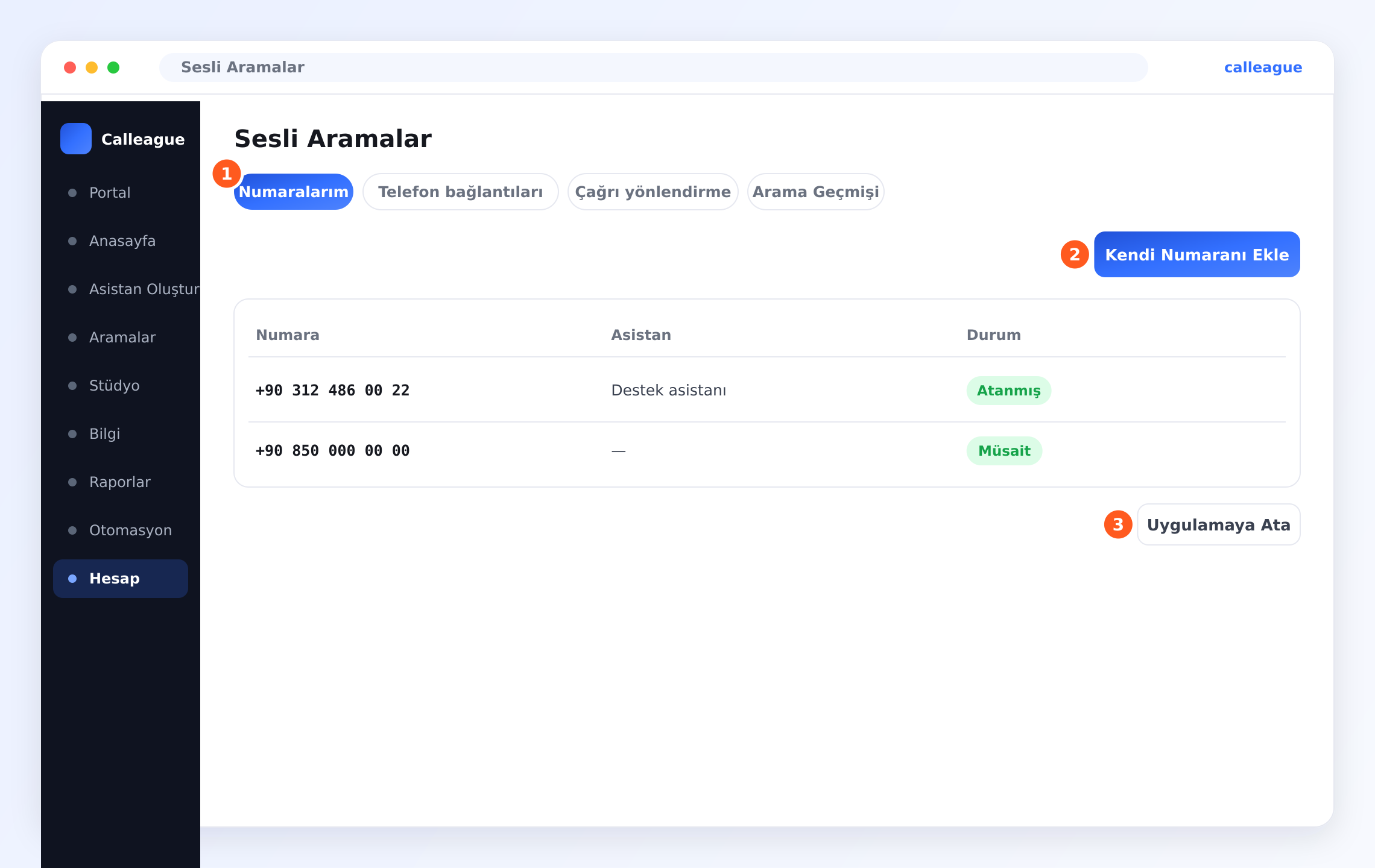
Asistanınızın telefona yanıt vermesi için bir numara bağlarsınız: sol menüden Hesap'a girin (telefonda sol üstte üç yatay çizgi ☰ düğmesine dokunun), açılan sayfada "Sesli Aramalar" bölümünü açın. Sonra konuşmalarınız Aramalar ekranına düşmeye başlar.
Bilgi
Bilgi sayfası, asistanınızın işletmenizi öğrendiği yerdir; böylece tahmin yürütmek yerine sizin bilgilerinizden yanıt verir. Sol menüdeki Bilgi'den ulaşırsınız (telefonda sol üstteki ☰ menü).
Veri ve gizlilik
Planlar ve faturalama
Bir şey farklı görünüyorsa
Ekranlar zamanla gelişir ve küçük şeyler başta kafa karıştırabilir. Şu tabloyu deneyin — "dur, bu nerede?" anlarının çoğunu bir dakikadan kısa sürede çözer.
| Gördüğünüz şey | Genellikle neden olur | Ne yapmalı |
|---|---|---|
| Telefon numarasını nereye ekleyeceğimi bulamıyorum | Numaralar Anasayfa'da değil, Hesap altındadır | Hesap → Sesli Aramalar → Numaralarım'a gidip **"Kendi Numaranı Ekle"**ye tıklayın |
| "Oluştur ve önizle" ilerlemiyor | "Asistan adı" boş ya da şablon seçilmemiş | Bir ad yazın, işinize en yakın şablonu seçin, sonra **"Oluştur ve önizle"**ye basın |
| "İndekslendi" yazısını göremiyorum | Web sitesi veya dosya henüz işlenmedi | Web adresini tekrar ekleyin ya da dosyayı yeniden yükleyip bekleyin |
| Kodu yapıştırdım ama sohbet balonu görünmüyor | Tek satırlık kod henüz canlı sayfada değil | Kodun sitenize eklendiğinden emin olun (gerekirse siteyi yöneten kişiye sorun); Konum (Sağ/Sol) ayarını kontrol edin |
| Aramalar listesi boş görünüyor | Henüz numara bağlı değil veya yeni hesap | Yeni hesapta bu normaldir; Hesap → Sesli Aramalar altında bir numara ekleyip atayın |
| Bir takım arkadaşı davet edemiyorum | Rolünüz buna izin vermiyor olabilir | Bir sahibe ya da yöneticiye daveti göndermesini veya rolünüzü değiştirmesini söyleyin |
| Asistanım bir yanıtı bilmiyor | O bilgi henüz eklenmemiş | Bilgi sayfasında bir web sitesi ekleyin ya da bir belge yükleyin |
Tablodan sonra hâlâ takıldıysanız, e-posta tam da bunun içindir. Yukarıdaki adımlardaki ayrıntıları gönderin, çözelim: info@arpanet.com.tr.
Mini sözlük
Bir kelimeye takıldıysanız, sade karşılıkları burada.
| Kelime | Ne demek |
|---|---|
| Yapay zekâ (AI) | Bilgisayarın insan gibi konuşup yanıt üretmesini sağlayan teknoloji; asistanınızın "beyni" |
| Sihirbaz | Sizi adım adım yönlendiren ekran; her adımda tek bir iş yaparsınız |
| Pano / Anasayfa | Giriş yaptıktan sonra gördüğünüz ana ekran |
| Portal | Asistanınızla sohbet ettiğiniz ekran (sol menüde) |
| Stüdyo | Asistanı ayrıntılı tasarladığınız ileri düzey alan; asistanın "Yayınla" sekmesi buradan açılır (sol menüde) |
| Yayınla | Asistanın içindeki sekme (Stüdyo'dan asistanı açıp ulaşırsınız); "Kullanmaya Başla" kutusunda Paylaşım Bağlantısı'nı bulursunuz |
| Widget | Web sitenizin köşesinde çıkan küçük sohbet balonu |
| Kod / satır | Web sitesine eklenen küçük bir metin; anlamanıza gerek yoktur |
| URL | Web adresi, örneğin www.isiniz.com |
| İndekslendi | Asistan eklediğiniz bilgiyi okudu, artık biliyor |
| Döküm | Bir telefon görüşmesinin yazıya dökülmüş hâli |
| Sekme | Bir ekranın üstündeki başlık düğmeleri (ör. Numaralarım, Arama Geçmişi) |
| Paylaşım Bağlantısı | Müşterilere gönderdiğiniz hazır sohbet linki; web sitesi gerektirmez |
| Otomasyon | Kendiliğinden çalışan hazır kurallar (ör. takip mesajı); yeni başlayanlar için şart değil |
| ☰ (üç yatay çizgi) | Telefonda sol üstteki menü düğmesi; sol menüyü açar |
| KVKK / GDPR | Kişisel verileri koruyan kanunlar (KVKK Türkiye, GDPR Avrupa) |
Sonraki adımlar
Asistanını oluştur
Adım adım sihirbazla ilk asistanınızı kurun.
Başlangıç
Genel bakış ve tam kurulum yolculuğunuz.
Sesli asistan
Telefona yanıt verin ve aramalarınızı inceleyin.
Güvenlik ve gizlilik
Verilerinizin ve kayıtlarınızın nasıl korunduğu.
Sorunuzu bulamadınız mı? info@arpanet.com.tr adresine yazın — Ankara'daki Calleague ekibinden gerçek bir kişi, Türkçe veya İngilizce size geri döner.
Son güncelleme