
Your data is safe
Your calls, transcripts and recordings are private, encrypted and yours — and you stay in control of every one of them.
When your assistant answers the phone, it hears real people sharing real things — a name, a phone number, an appointment time. We treat that information with the same care you would. This page explains, in plain words, how Calleague keeps your data private and how you stay in control of it.
Here is a real call inside Calleague. Everything you can see here — the conversation, the recording, the summary — is private to your account and protected for you.
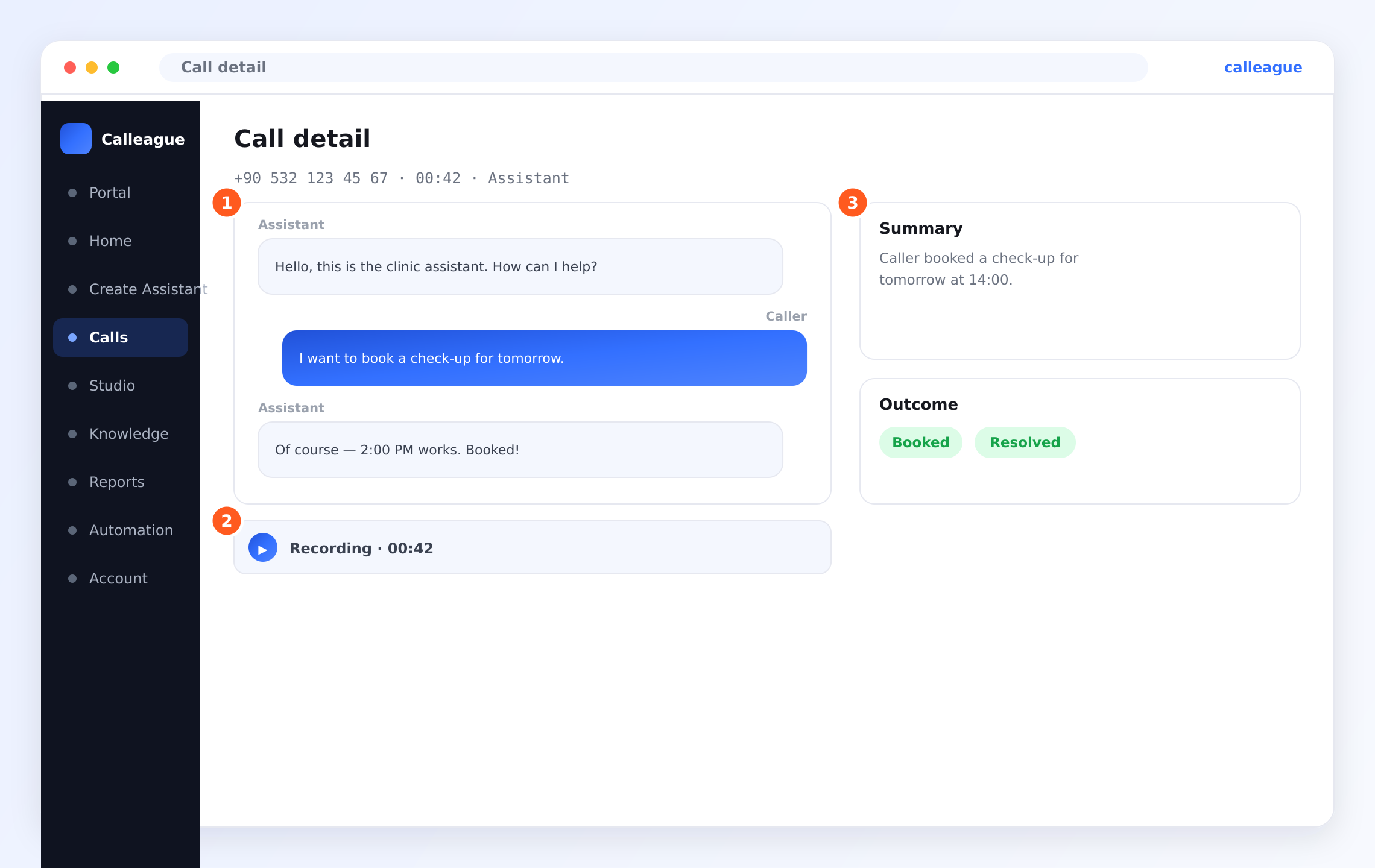
In this screen the orange markers point to exactly the things we keep safe for you: the ① written transcript (what the caller and your assistant said), the ② recording you can play back, and the ③ summary and outcome of the call. Only you and the people you invite can ever see this.
At a glance
Here is the short version. Everything below simply explains these points in more detail.
| Your data | How it is protected | What you control |
|---|---|---|
| The live conversation | Private to your account, encrypted | When the assistant answers or calls |
| The written transcript | Encrypted, only your team can read it | Who on your team can see it |
| Call recordings | Encrypted, kept only if you choose | On/off, and how long to keep them |
| Customer details (names, numbers) | Stored privately, never shared | What you collect and when to delete it |
| Your account & team | Sign-in protected, separate from every other business | Who you invite and what they can do |
You do not need to set up anything special to be protected. These safeguards are on by default. The choices below — like what gets recorded and who can see it — are simply yours to make.
What we protect
Everything that happens on a call is kept private:
- The conversation itself — what your caller says and what your assistant replies.
- The written transcript — the text version of the call you can read afterwards.
- The recording — the audio of the call, but only if you choose to keep one.
- Customer details — names, phone numbers, appointment times and anything else captured during a call.
- Your account — your team members, your settings and your billing information.
All of this is encrypted. That means it is scrambled and locked, so only your account can read it — both while it travels across the internet and while it sits safely stored. No other business using Calleague can ever see your calls, and you can never see theirs. Each business is kept completely separate, like having your own locked room.
You decide what gets recorded
Recording is always your choice, never something that happens behind your back.
- You turn call recording on or off whenever you like, for each assistant.
- If you do not want recordings, simply leave them off — your assistant still works perfectly and you can still read the written transcript.
- When you do record, the audio is encrypted and private, exactly like everything else.
- You can delete any recording at any time, right from the call's page.
In many places, you must let people know a call may be recorded. A short line in your greeting — "This call may be recorded to help us serve you better" — keeps everything clear and respectful. See the consent tips below.
Asking callers for consent
"Consent" simply means letting people know what is happening and giving them a chance to agree. It builds trust and keeps you on the right side of the rules. It only takes a moment to do well.
Tell people early
Add a friendly line to your assistant's greeting so callers know a call may be recorded — right at the start, before any details are shared.
Keep it plain and warm
Avoid legal-sounding language. "We may record this call to improve our service — is that okay?" is enough, and it sounds human.
Only collect what you need
If you do not need someone's full address to book a haircut, do not ask for it. The less you collect, the less you have to protect.
Honour requests right away
If a caller asks you not to record, or asks you to delete their details, respect it. You can turn recording off and request deletion in seconds.
A good habit: keep only the recordings you truly need, tell callers up front, and delete what you no longer use. Privacy done well is mostly common courtesy.
How long your data is kept
Your data is kept only as long as it is useful to you. You are always in control of this.
| Type of data | Default behaviour | What you can do |
|---|---|---|
| Transcripts | Kept so you can review past calls | Delete any time |
| Recordings | Kept only if recording is on | Turn off, or delete individually |
| Customer details | Kept while the relationship is active | Delete on request |
| Closed account data | Removed after you leave | Ask us to delete sooner |
A small shop might keep transcripts for a few weeks to follow up on orders, then clear them out. A clinic might keep an appointment note longer. There is no single right answer — keep what helps you, and clear out the rest.
Who can see your data
Your data is visible only to the people you choose.
- You and your team — only the people you invite to your account. You decide what each person can do using roles (for example, some can manage everything, others can only view calls).
- No other business — every business on Calleague is fully separated. Your calls are never visible to anyone outside your account.
- Our team — we do not read your calls or recordings. A small number of trusted staff may access systems only when strictly needed to keep the service running or to help you with a support request you have raised — never out of curiosity.
Inviting people and setting their roles happens in your team settings, under Account. Give each person only the access they need — it is the simplest way to keep your data safe.
Where your data is handled
Your data is handled securely and is not sold or shared with advertisers. Calleague is built and operated by a Türkiye-based company, with privacy and these protections designed in from the very start — not added on later.
We use carefully chosen, reputable providers to deliver the service (for example to keep things running reliably). They only ever handle your data to provide Calleague to you, under strict confidentiality, and never for their own purposes.
Asking us to delete your data
Your information belongs to you. If you want something removed — a single call, one customer's details, or everything — you can ask, and we will take care of it.
Decide what to remove
It could be one recording, one customer's records, all transcripts from a date range, or your entire account.
Delete it yourself where you can
Many things — like individual recordings and transcripts — you can remove directly in the app in a couple of clicks, from the call's own page.
Or send us a short note
For larger requests, email info@arpanet.com.tr telling us what to delete. A real person will handle it.
We confirm it is done
We remove the data and let you know. If the request came from one of your own customers, you can pass it to us the same way.
The rules that protect people
There are laws made to protect people's personal information. Calleague is built to respect them.
| Where you are | The rule we follow | What it means in plain words |
|---|---|---|
| Türkiye | KVKK | Personal information must be handled with care, kept only as long as needed, and deleted on request |
| Europe and many other regions | GDPR | People have the right to know what is held, to get a copy, and to have it deleted |
In everyday terms, both rules say the same thing: handle people's information carefully, keep it only as long as you need it, and remove it when asked. Calleague is designed to help you do exactly that, without any technical effort on your part.
You can use Calleague with confidence, knowing it was built with privacy and these protections in mind from day one.
Real examples
A dental clinic. The assistant answers after hours, takes the caller's name and a preferred time, and books the appointment. The greeting mentions the call may be recorded. Recordings are kept for two weeks in case of a question, then cleared. Only the receptionist and the owner can read transcripts.
A small online shop. The assistant handles "where is my order?" calls. The owner turns recording off — the written transcript is enough — so there is less to manage. When a customer asks to be forgotten, the owner deletes that customer's transcripts in a couple of clicks.
A growing agency. Several staff share one account. The manager invites each person with a role that fits — agents can view and handle calls, but only the manager can change settings or billing. Everyone sees only what they need.
If something looks different
| What you see | Why it happens | What to do |
|---|---|---|
| No recording on a call's page | Recording was switched off for that assistant | Turn recording on in the assistant's settings for future calls |
| A team member cannot see calls | Their role does not include that access | Update their role in your team settings under Account |
| You want a call permanently gone | It is still stored because nobody removed it | Delete it on the call's page, or email us for larger requests |
| A caller objects to being recorded | They were not told, or changed their mind | Turn recording off and add a consent line to your greeting |
| Worried a customer's data is still held | It stays until someone deletes it | Delete it in the app or send us a deletion request |
Frequently asked questions
Questions about your data?
We are happy to help. Calleague is made by Arpanet Bilişim Teknolojileri A.Ş. in Ankara, Türkiye. If you have any question about your privacy, or you want to request a deletion, write to us at info@arpanet.com.tr and a real person will get back to you.
Next steps
Last Updated
Team & billing
Invite your teammates, give each person the right role, watch your usage, and manage your plan and payment — all on simple screens, following along step by step, with no technical know-how needed.
Help & FAQ
Plain-language answers to the questions people ask most before and after they start using Calleague — no technical background needed, all grounded in the real screens and buttons you'll actually see in the app.